Building a ReAct Agent
A small ReAct agent project that makes the reasoning-action-observation loop visible instead of hiding tool use behind built-in function calling.
This project was a small build to make the ReAct pattern concrete. Instead of relying on built-in tool calling, I used a prompt-driven approach where the model outputs Thought and Action as plain text, and the application parses and executes the next step itself.
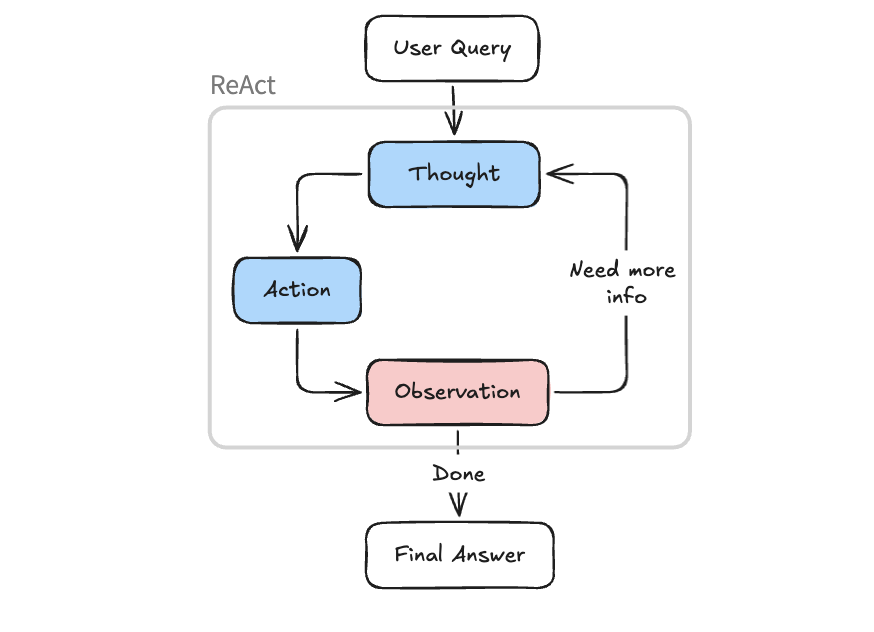
Why This Version Was Useful
Most modern tool-calling APIs are easier to use, but they also hide part of the reasoning process. I wanted a version where the control flow stayed visible:
- the model reasons in text
- the code parses the next action
- the tool executes outside the model
- the observation goes back into the loop
That makes the system less polished than native tool calling, but much easier to inspect and learn from.
Two Ways To Build The Agent
There are two clear implementation styles here.
The first is modern tool calling: you send tool definitions to the model, it returns a structured function call, and your application executes it. That is usually the more reliable production path.
The second is the classic ReAct pattern: the model emits plain-text reasoning plus an explicit action, and your code extracts the action with parsing logic. That is the version I built here because it makes the loop visible instead of treating it as a black box.
The Core Loop
The ReAct loop is simple in structure:
- start with the user query and system prompt
- send the full message list to the model
- read the model's
ThoughtandAction - parse the action into a tool name and arguments
- either finish or execute the tool
- append the observation and repeat
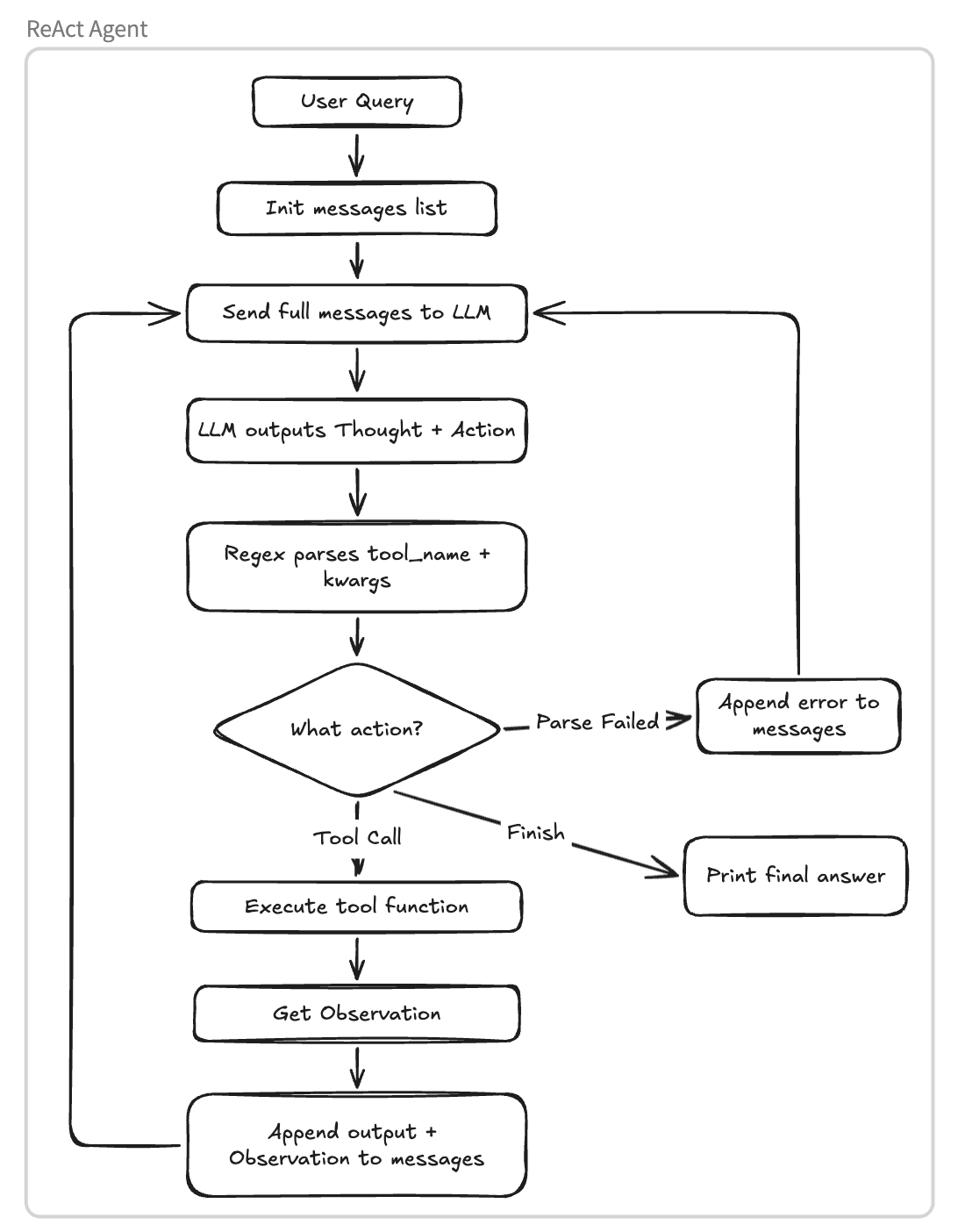
What I like about this pattern is that the boundary between model and runtime stays explicit. The model decides what it wants to do next, but the surrounding application still controls execution, error handling, and state updates.
What The Project Implements
- a system prompt that forces
Thought -> Actionoutput - regex-based parsing for
Action: tool_name(...)andFinish[...] - a bounded agent loop to avoid running forever
- tool execution through a Python dispatch table
- observation feedback that gets appended back into the message history
The demo agent itself is small: it checks weather information and suggests attractions. The point was not the travel use case, but the mechanics of reasoning, acting, and feeding observations back into the next step.
Example Output
=== Round 1 ===
LLM output:
Thought: The user wants to visit San Francisco. I need to check the weather first.
Action: get_weather(city="San Francisco")

→ Code parses: tool_name="get_weather", kwargs={"city": "San Francisco"}
→ Code executes: get_weather(city="San Francisco")
→ Observation: Current weather in San Francisco: Partly cloudy, temperature 15°C

=== Round 2 ===
LLM output:
Thought: The weather is partly cloudy at 15°C. Now I can recommend attractions.
Action: get_attraction(city="San Francisco", weather="partly cloudy")

→ Code parses: tool_name="get_attraction", kwargs={"city": "San Francisco", "weather": "partly cloudy"}
→ Code executes: get_attraction(city="San Francisco", weather="partly cloudy")
→ Observation: Golden Gate Bridge is great for partly cloudy days...

=== Round 3 ===
LLM output:
Thought: I have both weather and attraction info. Time to give the final answer.
Action: Finish[Based on the weather in San Francisco (partly cloudy, 15°C), I recommend visiting the Golden Gate Bridge...]

→ Code parses: tool_name="Finish", answer="Based on the weather..."
→ Print final answer and exit