RabbitMQ in Python: Exchanges, Routing Keys, and Bindings
A practical RabbitMQ note in Python focused on the routing model: what an exchange does, what a routing key carries, and how bindings decide which queues receive a message.
The part of RabbitMQ that usually feels confusing at first is not publishing or consuming. It is the routing model. In particular:
- what an
exchangeactually does - what a
routing keyis attached to - what a
binding keyis attached to
The shortest way to keep them straight is this:
exchange: the routerrouting key: the label that travels with the messagebinding key: the rule a queue registers with the exchange
The Mental Model
RabbitMQ producers usually do not send directly to a queue. They publish to an exchange. The exchange then decides which queue or queues should receive the message.
That means the three pieces play different roles:
- the producer publishes a message to an
exchange - the message carries a
routing key - each queue is connected to the exchange through a
binding - the binding may include a
binding keyor pattern
So the exchange is the decision point, the routing key is the message-side label, and the binding key is the queue-side matching rule.
Exchange
An exchange is a routing layer inside RabbitMQ.
Its job is not to store messages permanently like a queue. Its job is to inspect the incoming publish request and decide where that message should go next.
You can think of it as:
- receive message
- inspect exchange type
- compare routing key against bindings
- forward the message to matching queues
This is why exchanges are powerful: they separate message production from message destination.
Routing Key
A routing key is a string attached to the message when the producer publishes it.
Examples:
orders.createdorders.cancelledpayments.usFrance
The routing key is not the queue name. It is a label or tag that helps the exchange decide what to do with the message.
For example, a producer might say:
channel.basic_publish(
    exchange="events",
    routing_key="orders.created",
    body="new order"
)
That means:
- send this to the
eventsexchange - attach the label
orders.created - let the exchange decide which queues should get it
Binding Key
A binding connects a queue to an exchange.
That binding can optionally carry a binding key, which says what kinds of routing keys this queue wants to receive.
For example:
channel.queue_bind(
    exchange="events",
    queue="order_service",
    routing_key="orders.created"
)
Here the queue order_service is telling the exchange:
When you receive messages on
eventswith routing keyorders.created, send them to me.
That queue-side rule is what people often call the binding key.
So the difference is:
routing key: published with the messagebinding key: configured on the binding between exchange and queue
The exchange compares the two according to its routing algorithm.
How They Fit Together
The easiest way to see the relationship is as a sentence:
- a producer publishes to an exchange
- the message carries a routing key
- queues are bound to the exchange with binding keys
- the exchange matches the routing key against those bindings
- matching queues receive the message
That is the full routing path.
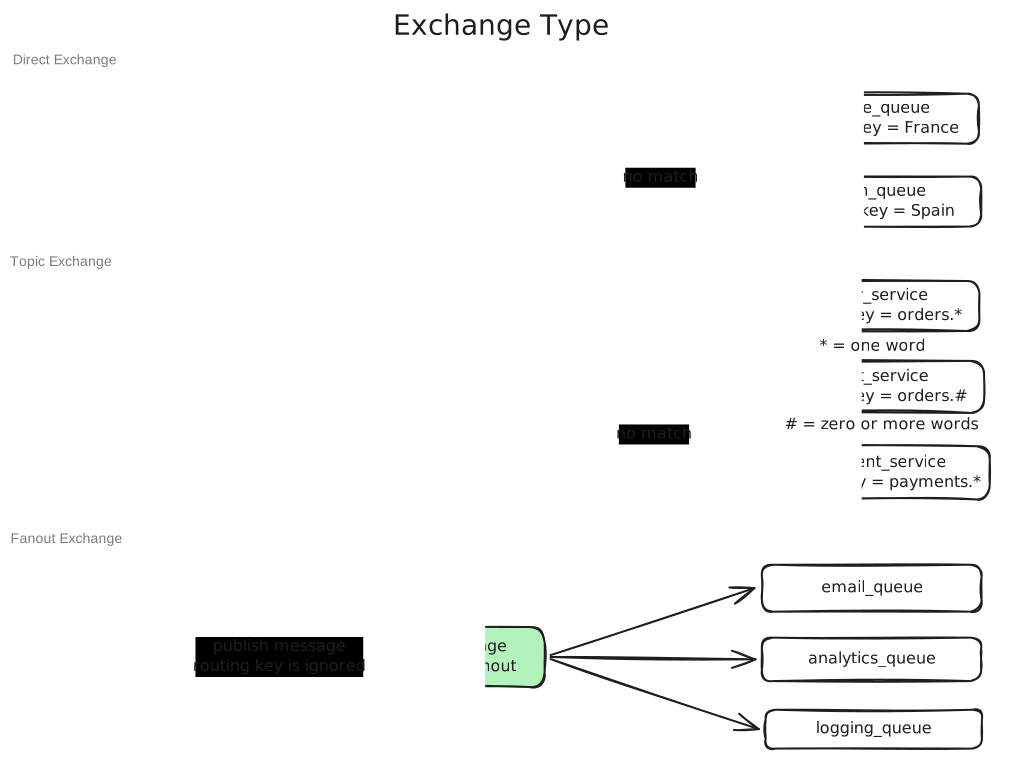
Exchange Types
RabbitMQ behaves differently depending on the exchange type.
Direct Exchange
A direct exchange looks for an exact match.
- routing key:
France - binding key:
France - result: match
This is good for simple point-to-point routing.
Topic Exchange
A topic exchange does pattern matching.
Typical patterns:
orders.**.createdpayments.#
Where:
*matches one word#matches zero or more words
So:
- routing key:
orders.created - binding key:
orders.* - result: match
This is good when you want flexible event categories.
Fanout Exchange
A fanout exchange ignores the routing key completely.
It simply broadcasts to every queue bound to the exchange.
This is useful when one event should go everywhere, such as notifications, metrics, or cache invalidation.
A Minimal Python Example
RabbitMQ's Python client is usually pika. The smallest useful example is a direct exchange with one queue.
Producer
import pika

connection = pika.BlockingConnection(
    pika.ConnectionParameters("localhost")
)
channel = connection.channel()

channel.exchange_declare(exchange="countries", exchange_type="direct")

channel.basic_publish(
    exchange="countries",
    routing_key="France",
    body="bonjour"
)

connection.close()
This means:
- publish to exchange
countries - attach routing key
France - let the exchange route it
Consumer
import pika

connection = pika.BlockingConnection(
    pika.ConnectionParameters("localhost")
)
channel = connection.channel()

channel.exchange_declare(exchange="countries", exchange_type="direct")
channel.queue_declare(queue="france_queue")
channel.queue_bind(
    exchange="countries",
    queue="france_queue",
    routing_key="France"
)

def handle_message(ch, method, properties, body):
    print(body.decode())
    ch.basic_ack(delivery_tag=method.delivery_tag)

channel.basic_consume(
    queue="france_queue",
    on_message_callback=handle_message,
    auto_ack=False,
)

channel.start_consuming()
This queue receives the message because:
- producer routing key =
France - queue binding key =
France - direct exchange requires exact match
The One Sentence Version
If you need one compact summary to remember:
- the
exchangedecides where messages go - the
routing keytravels with the message - the
binding keytells the exchange what a queue wants
That is the core RabbitMQ routing model. Once that is clear, direct, topic, and fanout exchanges stop feeling like different products and start feeling like different matching rules.
Key Takeaways
- producers normally publish to exchanges, not directly to queues
- a routing key belongs to the message publish call
- a binding key belongs to the queue-to-exchange relationship
- the exchange compares routing keys against bindings to decide delivery
- direct exchanges use exact match, topic exchanges use pattern match, and fanout exchanges broadcast
- if you remember "exchange routes, routing key labels, binding key matches," the model becomes much easier to reason about