WebSocket Protocol Fundamentals
WebSocket starts as an HTTP Upgrade request, switches to a frame-based protocol, and keeps one TCP connection open for full-duplex realtime communication.
This is the first note in a WebSocket series. It stays at the protocol layer: no framework code, no FastAPI implementation, and no deployment details yet. The goal is to understand what WebSocket is, why it exists, how it starts from HTTP, and what happens after the connection is upgraded.
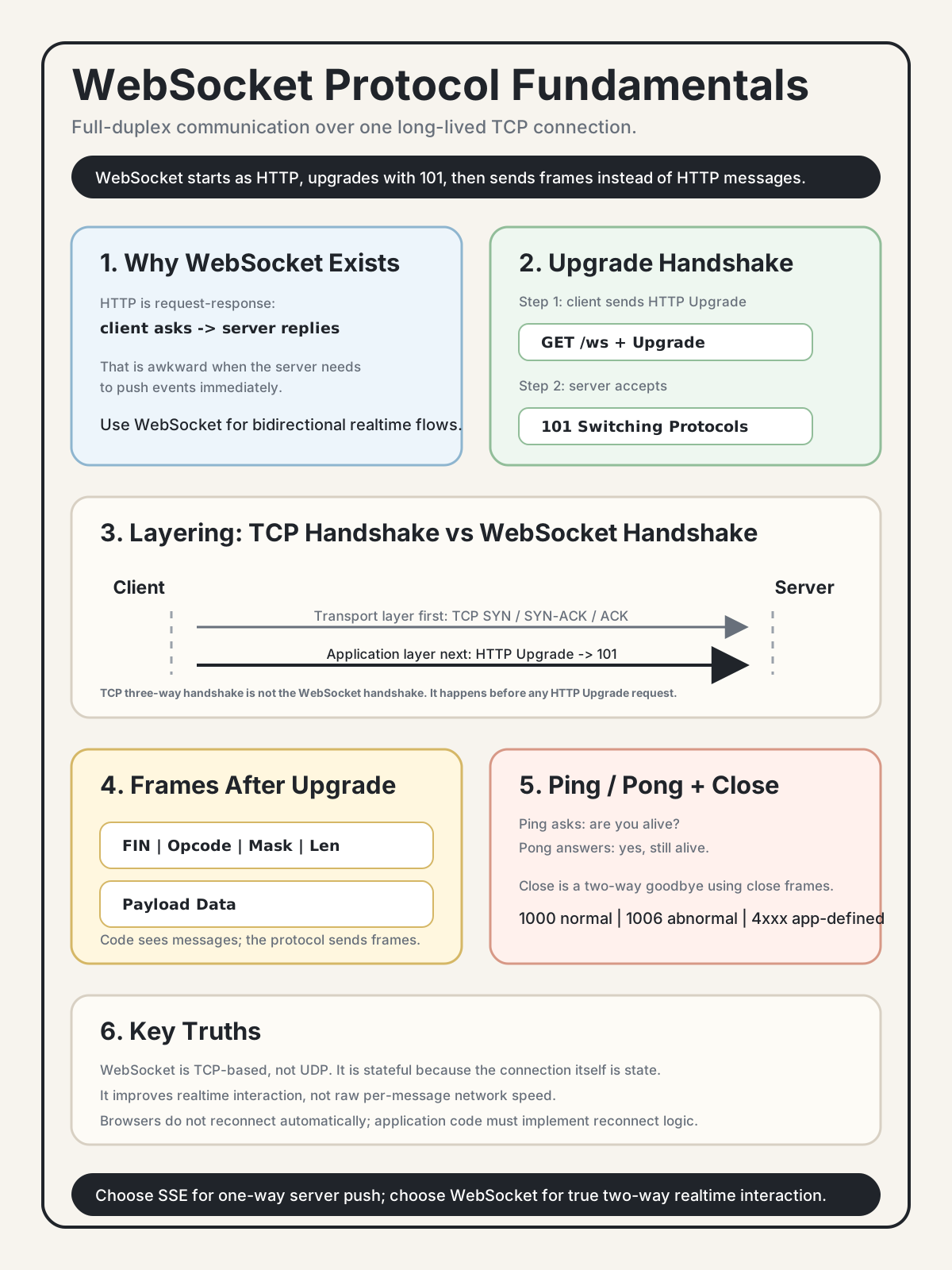
1. Why WebSocket Exists
WebSocket exists because HTTP has a fundamental limitation: classic HTTP is based on a request-response model.
Browser  -- "I want data" -->  Server
Browser  <-- "Here it is" --   Server
The client asks first. The server answers. Even when HTTP keeps the underlying TCP connection alive, the interaction pattern is still request first, response second.
That creates a problem:
How does the server push data to the client exactly when something happens?
Polling
With polling, the browser asks the server repeatedly:
Browser: Any new notification?  -> Server: No
5 seconds later
Browser: Any new notification?  -> Server: No
5 seconds later
Browser: Any new notification?  -> Server: Yes, here it is
Problems:
- Most requests may return "nothing new."
- Latency depends on the polling interval.
- Server resources are spent on repeated empty requests.
If the polling interval is 5 seconds, the average event delay is roughly 2.5 seconds.
Long Polling
Long polling keeps the request open until there is data or a timeout:
Browser: Any new notification? I can wait 30 seconds.
Server: holds the request
10 seconds later
Server: Yes, here is the event.
Browser: immediately starts the next long poll
This reduces latency, but each response still ends the HTTP exchange. The client has to reconnect for the next event.
Server-Sent Events
SSE keeps a one-way stream open:
Browser: Open an SSE connection.
Server: pushes event 1.
Server: pushes event 2.
SSE is useful when the server only needs to push data to the client. Notifications, stock prices, logs, and status streams are often good fits.
But SSE is one-way. Client-to-server messages still use regular HTTP requests.
WebSocket
WebSocket keeps one connection open and allows both sides to send data whenever they want:
Browser <--> ServerIt is full-duplex and persistent.
| Polling | Long Polling | SSE | WebSocket | |
|---|---|---|---|---|
| Realtime behavior | Poor | Good | Good | Best |
| Direction | Client starts each request | Client starts each request | Server -> client | Both directions |
| Protocol | HTTP | HTTP | HTTP | WebSocket |
| Complexity | Low | Medium | Low | Higher |
| Good fit | Simple refresh | Basic push | One-way server push | Two-way interaction |
Use SSE when you only need server-to-client push. Use WebSocket when both sides need to send messages over the same long-lived connection, such as chat, collaborative editing, presence, multiplayer games, or realtime dashboards with client actions.
2. WebSocket Starts as HTTP, Then Upgrades
The most important concept is this:
WebSocket does not begin as a completely separate connection protocol. It starts with HTTP and then upgrades.
This design lets WebSocket reuse familiar web infrastructure: ports 80 and 443, TLS, proxies, load balancers, cookies, headers, and authentication middleware during the handshake.
TCP Handshake vs WebSocket Handshake
Do not confuse the TCP three-way handshake with the WebSocket handshake.
They live at different layers:
Application layer: WebSocket handshake
Transport layer:   TCP three-way handshake
TCP connects first:
SYN -> SYN-ACK -> ACKOnly after the TCP connection exists can the browser send the HTTP request that asks for a WebSocket upgrade.
TCP three-way handshake is not the WebSocket handshake.
Step 1: Client Sends an HTTP Upgrade Request
GET /ws HTTP/1.1
Host: api.example.com
Upgrade: websocket
Connection: Upgrade
Sec-WebSocket-Key: dGhlIHNhbXBsZSBub25jZQ==
Sec-WebSocket-Version: 13
This still looks like HTTP. That is intentional. HTTP-aware infrastructure can inspect and forward the initial request.
The key headers are:
Upgrade: websocketConnection: UpgradeSec-WebSocket-KeySec-WebSocket-Version: 13
Step 2: Server Accepts the Upgrade
HTTP/1.1 101 Switching Protocols
Upgrade: websocket
Connection: Upgrade
Sec-WebSocket-Accept: s3pPLMBiTxaQ9kYGzzhZRbK+xOo=
101 Switching Protocols means:
From this point on, this TCP connection no longer speaks normal HTTP. It speaks the WebSocket protocol.
After the upgrade:
Same TCP connection
    ↓
No more HTTP request-response messages
    ↓
WebSocket frames
    ↓
Full-duplex communication
URL Schemes
http://  -> ws://
https:// -> wss://
ws:// is plaintext WebSocket. wss:// is WebSocket over TLS, similar to HTTPS.
Use wss:// in production.
3. After Upgrade: WebSocket Frames
After the upgrade, WebSocket does not send HTTP messages. It sends frames.
A frame is a small protocol-level unit with metadata and payload:
┌─────────────────────────────────┐
│ FIN | RSV | Opcode | Mask | Len │
├─────────────────────────────────┤
│          Payload Data           │
└─────────────────────────────────┘
Important fields:
| Field | Meaning |
|---|---|
FIN |
Whether this is the final frame of a message |
Opcode |
What kind of frame this is |
Mask |
Whether the payload is masked |
Payload Length |
How much payload data is in the frame |
Common opcodes:
| Opcode | Meaning |
|---|---|
0x0 |
Continuation frame |
0x1 |
Text frame, UTF-8 |
0x2 |
Binary frame |
0x8 |
Close frame |
0x9 |
Ping frame |
0xA |
Pong frame |
Client-to-server frames must be masked. That masking is handled by the browser or client library. Application code usually does not touch it.
Frames vs Messages
Frames are a protocol concept. Messages are what application code usually sees.
One application message can be split across multiple frames. The WebSocket library reassembles those frames before your application receives the message.
In application code, you usually think in messages:
data = await websocket.receive_text()
await websocket.send_json({"type": "notification", "body": "hello"})
The framework handles frame format, masking, fragmentation, and reassembly.
What you should still understand:
| Mechanism | Usually handled by framework? | Application impact |
|---|---|---|
| Binary frame format | Yes | Rarely relevant |
| Masking | Yes | Rarely relevant |
| Fragmentation | Yes | Relevant for very large messages |
| Ping / Pong | Partly | Important for liveness |
| Close frames and close codes | Partly | Important for reconnect and cleanup |
4. Ping / Pong: Application-Level Liveness
Ping and pong are a pair:
- Ping asks: are you still alive?
- Pong answers: yes, I am still alive.
Either side can send a ping. It is not only a client-to-server mechanism.
Why does this matter if TCP already has keepalive?
TCP keepalive exists, but defaults are often far too slow for realtime applications. On many systems, detecting a dead connection through TCP keepalive can take hours.
Realtime systems need faster liveness checks:
Every 30 seconds:
  Server -- ping --> Client
  Server <-- pong -- Client

If no pong arrives within a timeout:
  Server closes the connection and cleans up state.
Important correction:
Ping does not test one direction and pong the other direction as separate features. Ping asks, pong answers. Together they prove the connection is still usable.
Ping and pong are WebSocket control frames, not normal text messages. They usually do not show up in your normal message handler.
5. Closing a WebSocket Connection
WebSocket closing is a small two-way protocol, not just one side disappearing.
Normal close flow:
Side A wants to close.
Side A sends a Close frame with a close code and optional reason.
Side B receives the Close frame.
Side B sends a Close frame back.
Both sides close the underlying TCP connection.
If one side crashes, loses network, or force-kills the process, the other side may not receive a close frame. That is when heartbeats and timeouts matter.
Close Codes
Close codes are like status codes for connection shutdown:
| Code | Meaning |
|---|---|
1000 |
Normal closure |
1001 |
Going away, such as server shutdown or browser page closing |
1002 |
Protocol error |
1003 |
Unsupported data |
1006 |
Abnormal closure; no close frame was received |
1008 |
Policy violation, such as auth failure |
1011 |
Internal server error |
4000-4999 |
Application-defined close codes |
1006 is common and frustrating because it means the connection disappeared without a clean WebSocket close frame. Client code often treats this as a reconnect signal.
The 4xxx range is useful for application design. For example:
4001: authentication failed4002: server maintenance4003: user was kicked4004: protocol version mismatch
With application-specific close codes, the client can decide whether to reconnect, show an error, refresh auth, or stop trying.
6. Common Misconceptions
WebSocket Is Not UDP
WebSocket is based on TCP. It inherits TCP behavior:
- reliable delivery
- ordered bytes
- connection state
- congestion control
- possible head-of-line blocking
If you need UDP-like behavior, such as loss-tolerant low-latency media or game-state transport, look at WebRTC, UDP-based protocols, or HTTP/3 over QUIC.
WebSocket Is Not Stateless
The WebSocket connection itself is state.
The server must know:
- which user owns the connection
- which connection object is active
- which rooms or channels it joined
- how to clean it up when it disconnects
This is why WebSocket systems are harder to scale than ordinary stateless REST APIs.
WebSocket Is Not Automatically Faster Than HTTP
WebSocket improves realtime interaction by avoiding repeated request setup and allowing either side to send immediately.
But a single WebSocket message still travels over TCP. It is not magically faster at the packet level.
HTTP/2 can also multiplex many request-response streams over one TCP connection. WebSocket solves a different problem: bidirectional message flow.
Browsers Do Not Auto-Reconnect
The browser WebSocket API does not reconnect for you.
If the connection closes, it stays closed. Reconnect logic must be implemented by application code.
That usually means:
- exponential backoff
- max retry limits
- auth refresh if needed
- replay or resubscribe after reconnect
- handling duplicate messages safely
WebSocket Does Not Work Everywhere by Default
WebSocket commonly uses ports 80 and 443, but some infrastructure still needs explicit support:
- enterprise proxies may block or mishandle upgrades
- CDN and load balancer WebSocket forwarding may need to be enabled
- idle timeouts may close quiet connections
- HTTP/2 intermediaries may behave differently from HTTP/1.1 upgrade paths
This is why some production systems use libraries or gateways with fallbacks, such as long polling.
7. Connection Cost
WebSocket is not free. Each connection consumes resources.
| Resource | Per Connection | 10,000 Connections |
|---|---|---|
| TCP connection state | Roughly KBs | Tens or hundreds of MBs |
| Application buffers | Roughly KBs | Tens of MBs |
| File descriptor | 1 | 10,000 |
| Coroutine or task object | Roughly KBs | Tens of MBs |
Important points:
- 10,000 mostly idle connections can be reasonable on one well-tuned server.
- File descriptors are a hidden limit. Linux defaults such as
ulimit -nmay be too low. - Message throughput is usually more expensive than idle connection count.
- Long connections pair naturally with async I/O because idle connections should not block threads.
Key Insights
-
WebSocket intentionally attaches itself to HTTP. It uses an HTTP Upgrade handshake, familiar ports, TLS, and existing web infrastructure before switching protocols.
-
TCP handshake and WebSocket handshake are different. TCP establishes the transport connection first. WebSocket then performs an application-layer HTTP Upgrade.
-
Frames are protocol-level; messages are application-level. Your code usually sends and receives messages, while the library handles frames, masking, fragmentation, and reassembly.
-
Ping/pong is a liveness mechanism. TCP keepalive is often too slow for realtime systems, so applications need faster heartbeat behavior.
-
Close codes are part of application design. The
4xxxrange lets your application explain why it closed a connection so the client can respond correctly. -
WebSocket is stateful. The open connection is server-side state, which affects scaling, cleanup, reconnect, and deployment architecture.
Self-Check
If you can answer these, the protocol layer is starting to stick:
- What is the relationship between WebSocket and HTTP?
- Why is WebSocket based on TCP rather than UDP?
- When should you choose WebSocket instead of SSE?
- Why do WebSocket systems need ping/pong?
- Why does the browser not automatically reconnect?
- How many steps are in the WebSocket handshake, and is it the same as the TCP three-way handshake?
Answer Key
-
WebSocket starts as an HTTP request and uses HTTP Upgrade to switch protocols. After the server returns
101 Switching Protocols, the same TCP connection carries WebSocket frames instead of normal HTTP request-response traffic. -
WebSocket is TCP-based because it is designed for reliable, ordered, connection-oriented communication over existing web infrastructure. It begins from HTTP, and HTTP normally runs over TCP or TLS-over-TCP in the classic WebSocket upgrade path.
-
Choose SSE when the server only needs to push events to the client. Choose WebSocket when both sides need to send messages over the same long-lived connection.
-
Ping/pong detects dead or half-open connections faster than default TCP keepalive. It lets the application close stale connections and clean up server-side state.
-
Browsers do not automatically reconnect because the WebSocket API exposes connection lifecycle events but leaves retry policy to the application. Different apps need different backoff, auth refresh, and resubscription behavior.
-
The WebSocket handshake is a two-step application-layer upgrade: client HTTP Upgrade request, then server
101 Switching Protocolsresponse. It is not the TCP three-way handshake. TCP connects first; WebSocket upgrades after that.