YouDescribe: AI Audio Description Pipeline
A pipeline that turns raw video into scene-segmented, cross-checked, precisely-timed audio descriptions.
Terms
- Transcript — the text transcribed from the video's own audio
- Caption — YouTube's own caption track
- Audio description — describes what's happening visually on screen
- Audio clips — audio description for the scene
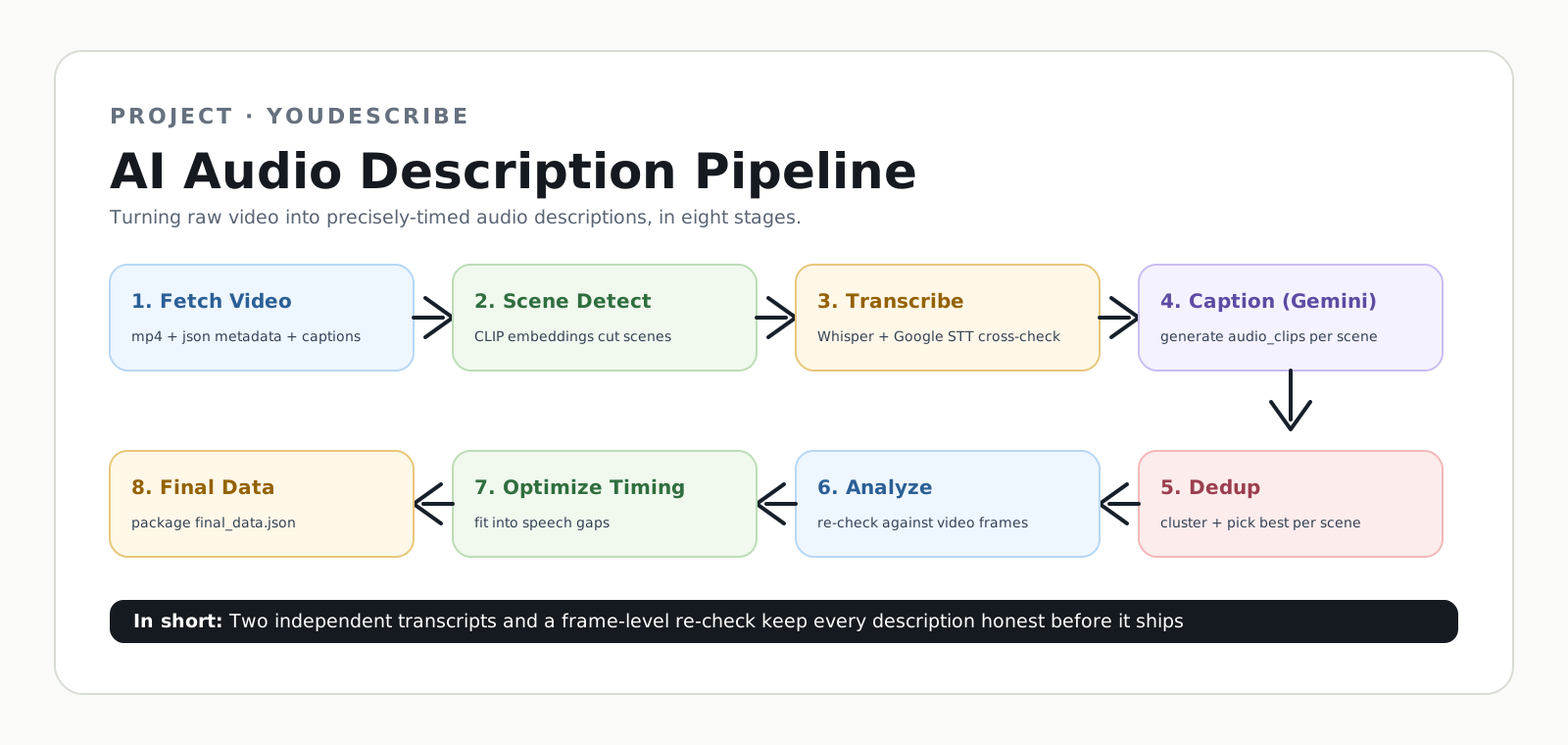
Step 1: Fetch Video
{video_id}.mp4(video){video_id}.json(metadata: title, description, category, captions){video_id}_thumbnail.jpg
Step 2: Key Frame Scene Detector
Split the video into scenes: scene_001, scene_002, scene_003
- FFmpeg: extract 1 frame every 15 frames (sampling interval)
- Put each sampled frame into OpenAI CLIP ViT-B/32 (running locally)
- Embedding: CLIP turns frames into embeddings
- Similarity check: compare consecutive frames' cosine similarity
- Two thresholds
- if similarity < 0.95 → candidate keyframe (for future QA)
- if similarity < 0.88 → scene boundary (cut)
- Output: scenes cut at boundaries
- Post-process:
- if two boundaries are too close (< 9s): merge forward until 9s
- if two boundaries are too far (> 25s): force split evenly
- if a leftover scene is < 2s, compare similarity and merge to the closer neighbor
Output: scene_info.json, mp4 clips
Step 3: Transcribe Scene (Speech to Text)
Add the transcript (spoken content) + captions to each scene.
- FFmpeg: extract audio from scene_XXX.mp4 → 16kHz mono .wav
- Transcribe with Whisper (large-v3-turbo, run locally)
- Transcribe the same audio with Google Cloud Speech-to-Text (cloud API)
- Cross-check
- filter out Whisper "garbage"
- compare Whisper vs Google text globally
- if they roughly agree (WER ≤ 0.35) → trust all Whisper segments
- if they disagree → only keep Whisper segments where Whisper itself was highly confident (≥ 0.80), drop the rest
- Also match existing YouTube captions to this scene's time range, but if captions are basically identical to the transcript already generated (>80% similar), discard captions (redundant)
Output: write "transcript" (+ "captions") fields back into scene_info.json
Step 4: Video Caption (Gemini-3-flash-preview)
Use transcript + captions to generate audio_clips for each scene.
- The input is divided into two parts:
- Part 1 — Scene: scene_XXX.mp4 (raw bytes), sampled at 4.5 FPS
- Part 2 — Prompt, including:
- system_instruction
- PROMPT_TEMPLATE:
- scene_duration
- context_block, which has:
- video category (genre)
- TRANSCRIPT (from Step 3, transcribed from the video's own audio)
- CAPTIONS (from Step 1 / YouTube, matched to this scene's time range in Step 3)
- voice_rule (according to genre)
- Call Gemini:
- model: gemini-3-flash-preview
- temperature = 0.0 (make the output more deterministic and consistent)
- max_output_tokens = 8912
- response_mime_type = "application/json" + response_schema
- max_retries
- model: gemini-3-flash-preview
Output: a JSON file containing an audio_clips list. Each item includes:
type— the description type, e.g."Visual"text— the audio description textstart_time— when the description should be inserted within the scene
Step 5: Clip Deduplicate
Within the same scene, deduplicate conflicting audio_clips descriptions from Step 4.
Phase A — Clustering: group candidate descriptions that occur close together in time.
- use
global_start_timeto determine grouping - special rule: two
"Text on Screen"candidates are never placed in the same cluster, to prevent one text description from replacing another
Phase B — Picking (model-based): if a cluster contains two or more candidates, send the cluster to Gemini and use its selection result.
Step 6: Clip Analyze
Within the same scene, re-examine the video for each surviving audio_clip, then decide whether to keep, correct, or discard it.
- Check whether the scene contains dialogue:
- has transcript → STRICT mode: use a higher threshold; if uncertain, drop the candidate
- no transcript → PERMISSIVE mode: use a lower threshold, because audio description may be the blind viewer's only source of information
- For each candidate, the model goes through a 4-step evaluation instead of directly trusting the candidate text:
- EVIDENCE — the model re-examines the video around that timestamp
- ACCURACY — check whether the candidate description matches what the model sees
- CORRECTION
- NECESSITY
Output: verdict — keep_original / keep_corrected / drop + reason
Step 7: Description Optimize Inline
For the remaining descriptions, we adjust their timing and duration within the same scene.
- estimate TTS duration
- identify available speech gaps
- merge nearby descriptions into beats
- fit descriptions into available gaps
- clean up the output by stripping unnecessary prefixes like
"Caption:"or"Text:"
Step 8: Prepare Final Data + Handoff (prepare_final_data.py)
Combine the results from all scenes into a single final_data.json for the whole video.
- prepare_dialogue: convert scene-relative transcript timestamps to absolute video timestamps
- prepare_audio_clips: determine the
track_typefor each retained description - package the results into
final_data.json:
{
  "dialogue_timestamps": "...",
  "audio_clips": "...",
  "youtube_id": "...",
  "video_name": "...",
  "video_length": "..."
}