VLM Basics: What a Model Actually Sees
A frame never reaches a vision-language model as pixels. Seven facts about images, JPEG, base64, vision encoders, and where VLMs still fall short, checked against a real evaluation pipeline.
Every example below is computed from one real frame pulled out of a video used in an audio-description evaluation pipeline, not a made-up illustration. The frame is vlm-basics-frame-example.jpg, shown in section 2.
1. What a VLM Actually Eats: Images, Not Video
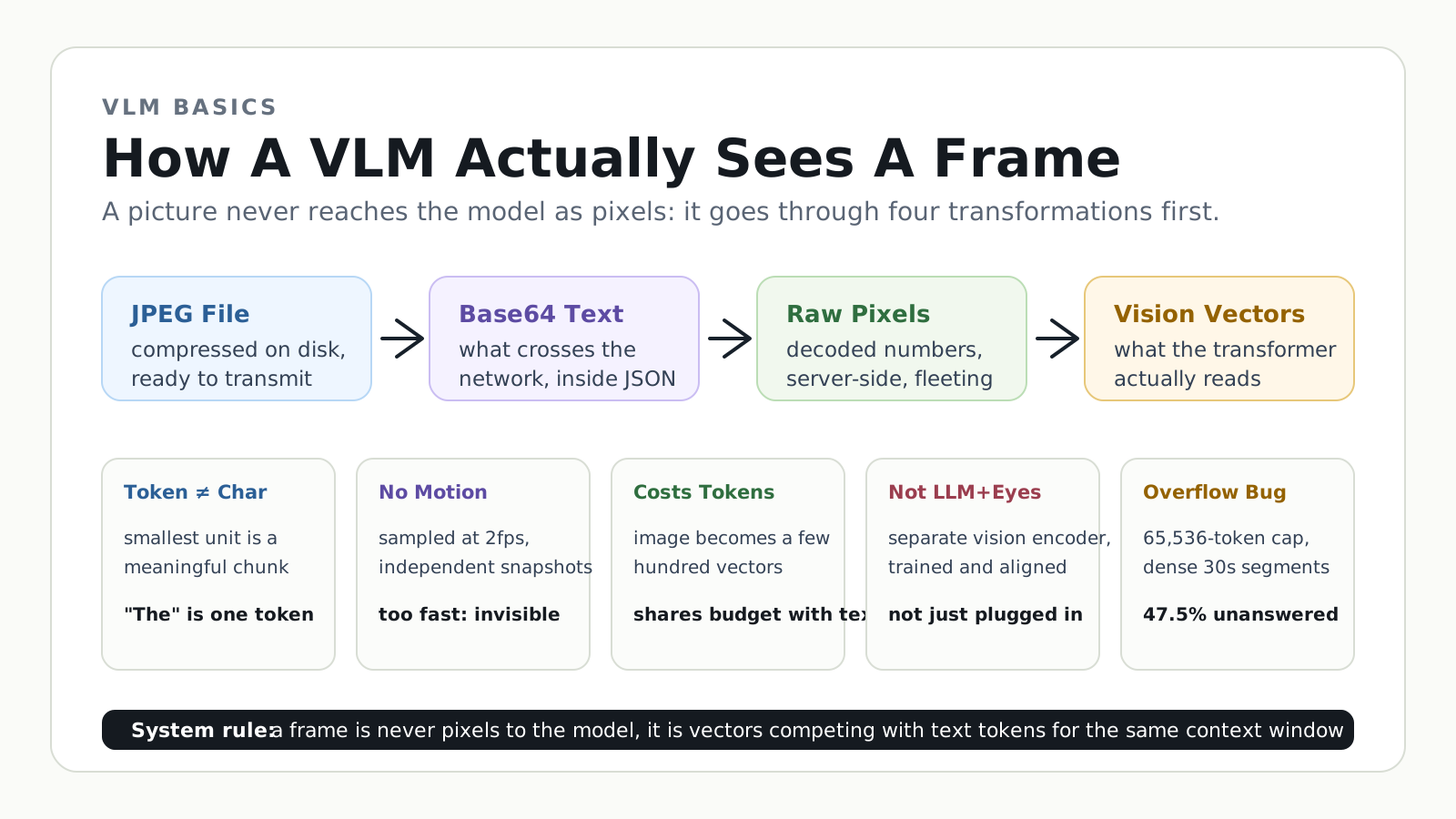
A VLM ("vision-language model") is an LLM that can take images as well as text as input. The API contract for that input is narrow: a JPEG or PNG image block, nothing else. There is no "video" type. (What makes that image input possible under the hood, a separate vision encoder bolted onto the LLM, is covered in section 6.)
So when a VLM "reads a video," there's no separate video code path being invoked. The evaluation pipeline behind this post makes that mechanical: pipeline/frames.py runs ffmpeg over the source .mp4, samples frames at a fixed rate (2fps here, one every 0.5s), saves each one as its own JPEG with a timestamp, and sends that stack of ordinary images, not the video file, to the model.
Gemini's API is a partial exception: it can accept a native video file upload and does its own internal frame sampling plus audio. This pipeline deliberately doesn't use that path for any of its three providers. OpenAI and Anthropic don't accept video at all, so keeping all three providers on the same "pre-extracted JPEG frames" footing is what makes their results comparable.
The model has never watched anything play continuously. It receives a pile of independent snapshots, like a flip-book, and has to infer what happened between frames on its own.
A real limitation: at 2fps, anything faster than half a second can fall entirely between two sampled frames, and the model simply never sees it. Sampling at 2, 3, or 4fps barely moved human-rater agreement in this pipeline: pulling more frames doesn't mean the model perceives more real detail, it just costs more tokens.
Underneath the container format, video is just many of these images shown one after another over time (24-60 per second, too fast for the eye to see them as separate pictures), plus an audio track the model above never receives. Every one of those sampled frames is a JPEG. Before looking at what compression does to one, it helps to see what an uncompressed picture actually is.
2. A Picture Is a Giant Table of Numbers
A digital image, at its rawest, is a spreadsheet: one row per pixel-row, one column per pixel-column, and every cell holds 3 numbers (red/green/blue, 0-255). Nothing about "shapes" or "objects" is in there, just numbers in a grid.
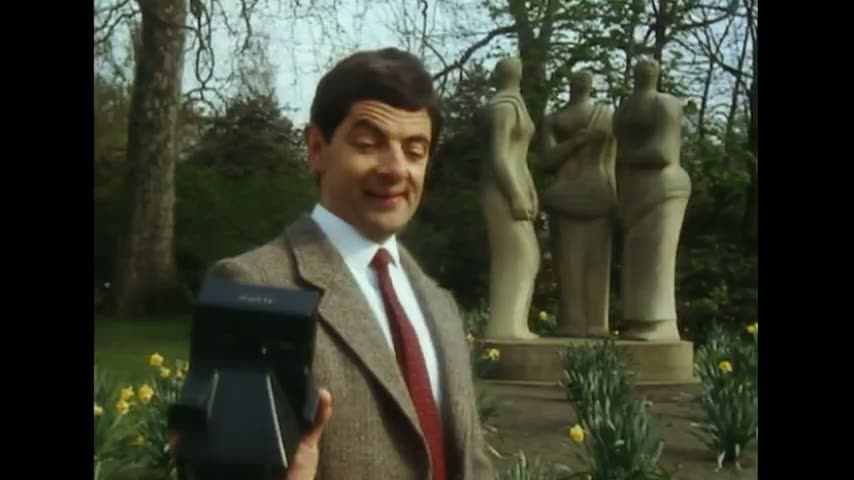
Decompressing this exact frame:
resolution:        854 x 480
raw pixel table:    480 rows x 854 cols x 3 channels = 1,229,760 numbers
Zoom into one tiny, real corner of it: an 8x8 patch (64 pixels, marked in red below) sitting right where a bare branch crosses the sky above the subject's head.
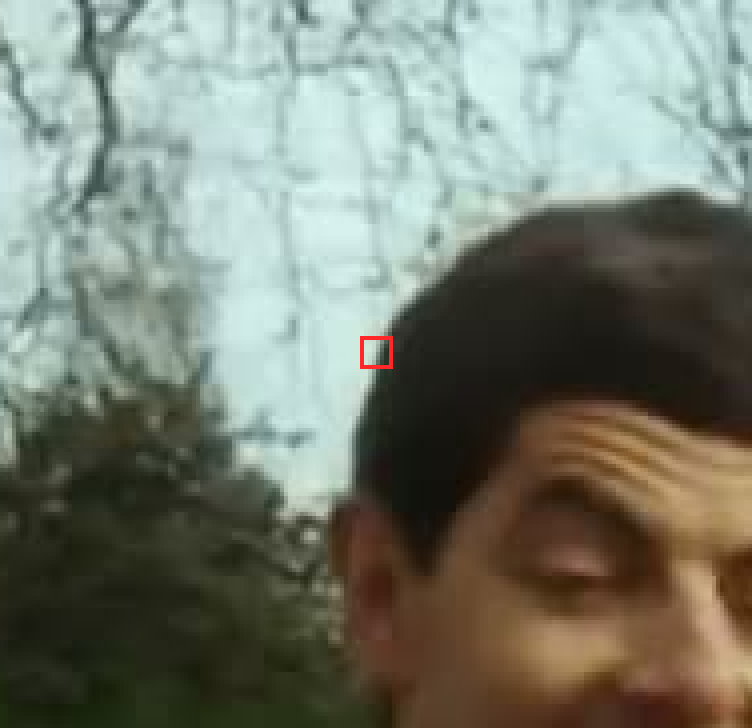
Blown up so each pixel is a single colored square with its actual (R, G, B) values printed inside, that patch looks like this:
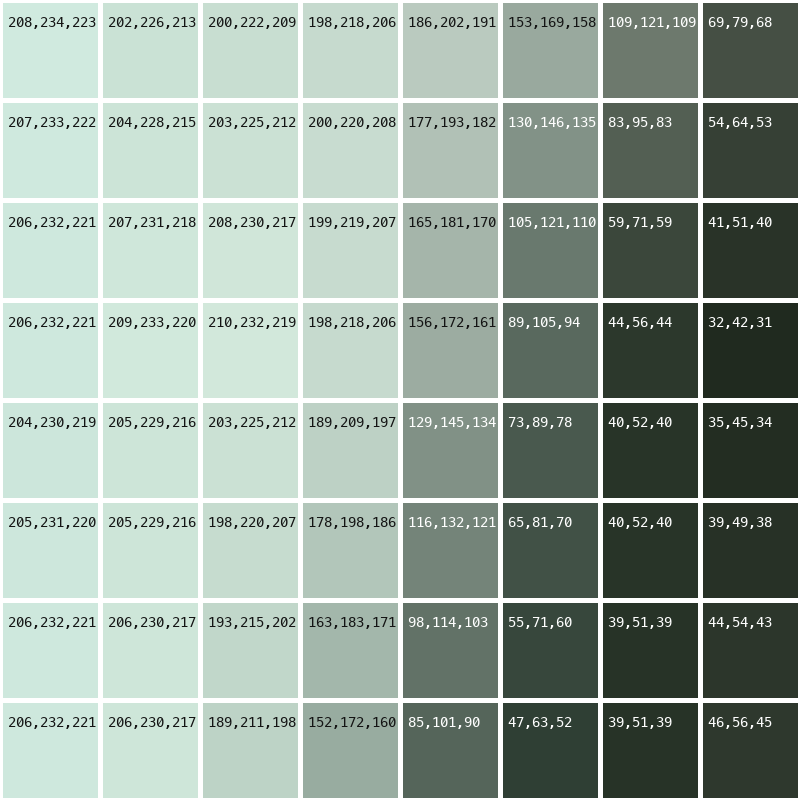
Every square is just 3 numbers. The pale sky is (208, 234, 223), the dark branch silhouette is (39, 51, 39), and the gradient between them is nothing more than those numbers stepping down. A full 854x480 frame is 40,635 more of these 8x8 patches, tiled edge to edge.
3. JPEG Is a Compression Trick, Not a Different Kind of Image
JPEG isn't "another kind of picture", it's a compression method. Most of those 1,229,760 numbers encode detail the human eye can't actually distinguish, so JPEG throws a lot of it away in exchange for a much smaller file:
raw pixel numbers:   1,229,760
compressed JPEG:        36,240 bytes
That's roughly a 30x reduction. Any image viewer decompresses the JPEG back into that pixel table before it can display anything: JPEG is a "pack it small" format, not a second form the image actually takes.
4. One Picture, Four Disguises
Before a picture reaches the Transformer, it passes through four different representations:
| Stage | Representation | Size (this frame) | Where |
|---|---|---|---|
| ① compressed JPEG | compressed bytes | 36,240 bytes | on disk, ready to send |
| ② base64 | a long text string | 48,320 characters | what actually crosses the network, packed into a JSON request |
| ③ decompressed | raw pixel table | 1,229,760 numbers | exists only inside the server, never on the wire |
| ④ vision-encoder output | a small set of vectors | a few hundred vectors, far smaller than 1.2M | what actually enters the Transformer, competing with text tokens for context length |
The key point: what travels over the network is ①'s base64 encoding (②), not the raw numbers (③) and not the vectors (④). The transport format and the format the model actually "understands" are two different things.
The Transformer itself doesn't know or care whether a given position's vector came from text or from an image patch: it just sees a sequence of equal-length vectors and runs the same attention math on all of them. That's also why "how many tokens does an image cost" isn't about how many "words" the picture was split into: it's about how many small patches it was cut into, each patch occupying one slot in the sequence, competing for the exact same context budget as a text token.
5. What Actually Gets Sent to the Model
Here's the real structure the pipeline builds (pipeline/providers/openai_provider.py), base64 truncated for space:
[
  {"role": "system", "content": "(issue taxonomy, ~2000 words)"},
  {"role": "user", "content": [
    {"type": "text", "text": "=== segment 10.0s-12.0s ==="},
    {"type": "text", "text": "[10.0s]"},
    {"type": "image_url", "image_url": {"url": "data:image/jpeg;base64,/9j/..."}},
    {"type": "text", "text": "[10.5s]"},
    {"type": "image_url", "image_url": {"url": "data:image/jpeg;base64,/9j/..."}}
  ]}
]
It's one long list, alternating "text label, image, text label, image". This snippet only shows 2 frames (1 second); a real 30-second segment carries 76-90 frames, so the list runs 150-180 blocks long, and the base64 alone adds up to several MB of JSON text.
Two parts are mandatory: "type": "image_url" tells the API this block is an image, and the data:image/jpeg;base64,... prefix must correctly name the format so the decoder knows how to unpack it.
One label isn't required by any API: the plain-text [10.0s] timestamp before each image. An image carries no time information on its own, so without that label the model can only guess a frame's time from its position in the list, which makes timing judgments (was the audio description placed correctly?) unreliable.
6. VLM Is Not "LLM Plus Eyes"
Section 1 said a VLM just "takes images". Here's what actually makes that true. Running one of the local models produced this log line:
Resolved architecture: Qwen2_5_VLForConditionalGeneration
The _VL_ in that class name is the whole story: this architecture bundles two things together, a text Transformer, plus an entirely separate, separately-trained vision encoder, with dedicated code for handling image_url content blocks.
A pure text LLM (the same family's Qwen2ForCausalLM, no _VL_) simply does not have that vision encoder. It isn't "disabled", the weights never existed in the first place. Feed it an image and it has no way to turn pixels into vectors: it errors out or can't process the input at all.
A crash log from another local model surfaced the class InternVLVideoProcessor, itself part of that same independent vision subsystem. A text-only LLM has no equivalent class.
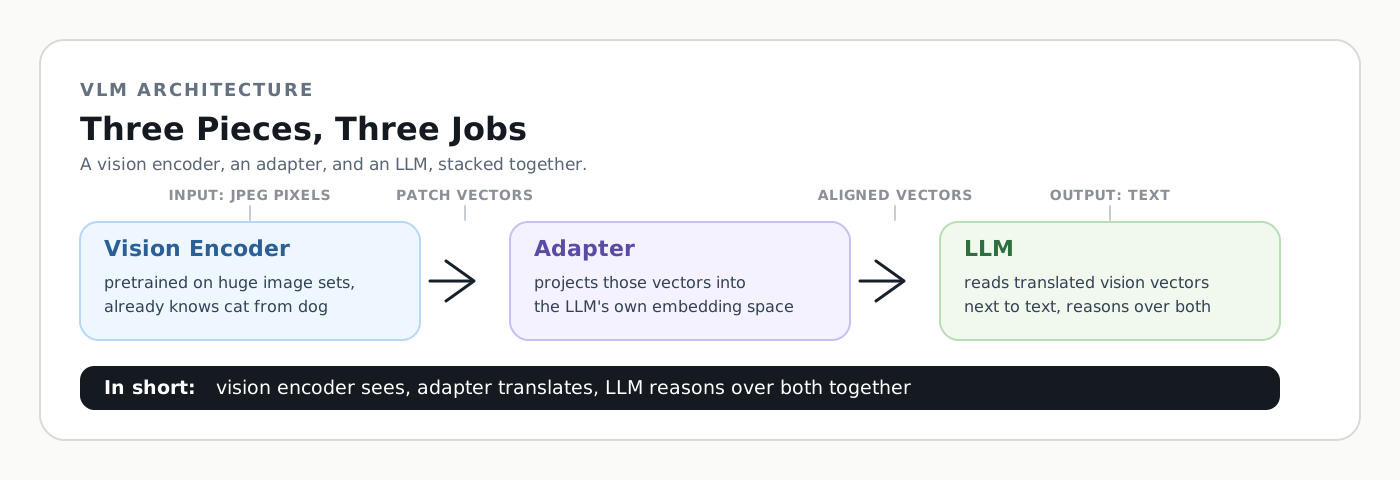
VLM = LLM + a separately-trained vision encoder + an adapter layer that aligns both into the same vector space. All three are required. Feeding image bytes to a plain LLM doesn't turn it into a VLM.
The two added pieces do different jobs, and it's easy to blur them together. The vision encoder is the one pretrained on huge image datasets, it already "knows" what visual patterns correspond to concepts like cats vs. dogs, and outputs vectors that encode that. But those vectors live in the vision encoder's own private embedding space, one the LLM has never seen and doesn't understand. The adapter doesn't learn to recognize anything new; it's a translator between two coordinate systems, reshaping the vision encoder's vectors into the same space the LLM's own text-token embeddings live in, so a "this is a cat" vector and the text token "cat" land somewhere the LLM's attention can actually compare them. Vision encoder sees, adapter translates, LLM reasons over both together.
7. What VLMs Still Get Wrong
Knowing how the pieces fit together also explains where they fall short:
- Resolution is a token-cost lever, not just a sharpness setting. OpenAI's high-detail mode resizes an image so its shortest side is 768px, then tiles the result into 512x512 blocks, charging a base 85 tokens plus 170 tokens per tile: a 1024x1024 image becomes a 2x2 grid of tiles, 765 tokens total. The same image sent in low-detail mode skips tiling entirely, a flat 85 tokens, regardless of size.
- Images get silently resized before the model ever sees them. This pipeline's own frame extraction (
pipeline/frames.py) caps every frame at 1024px on its longest side and never upscales, so a 4K source video is already coarsened down to that cap before a single frame reaches any API. - Counting and precise position are a known weak spot. Ask a VLM "what's in this photo" and it usually does well. Ask it "exactly how many people are in this photo" or "is the cup to the left or right of the plate" and it fails far more often, even on simple images. A likely reason: the vision encoder was mostly trained to match a whole picture to a one-line caption like "two people at a table", which teaches it what is in a picture, not exactly where things are or how many there are.
- Reading text in an image is the exception, and it's a separate skill. VLMs are often genuinely good at reading a sign or label out of a photo, but that strength seems to come from a different, more OCR-like process for recognizing text shapes, not from the same spatial reasoning that struggles with counting and position. So a model can transcribe a paragraph off a photo perfectly while still getting "how many people are in it" wrong.