FastAPI WebSocket Handler Lifecycle
Understand why a FastAPI WebSocket handler lives as long as the connection lives, from accept to receive loop to disconnect cleanup.
This is the second note in the WebSocket series.
Previous note: WebSocket Protocol Fundamentals
The goal here is practical but still small: build a minimal FastAPI WebSocket echo endpoint, understand the shape of FastAPI's WebSocket API, and internalize the connection lifecycle.
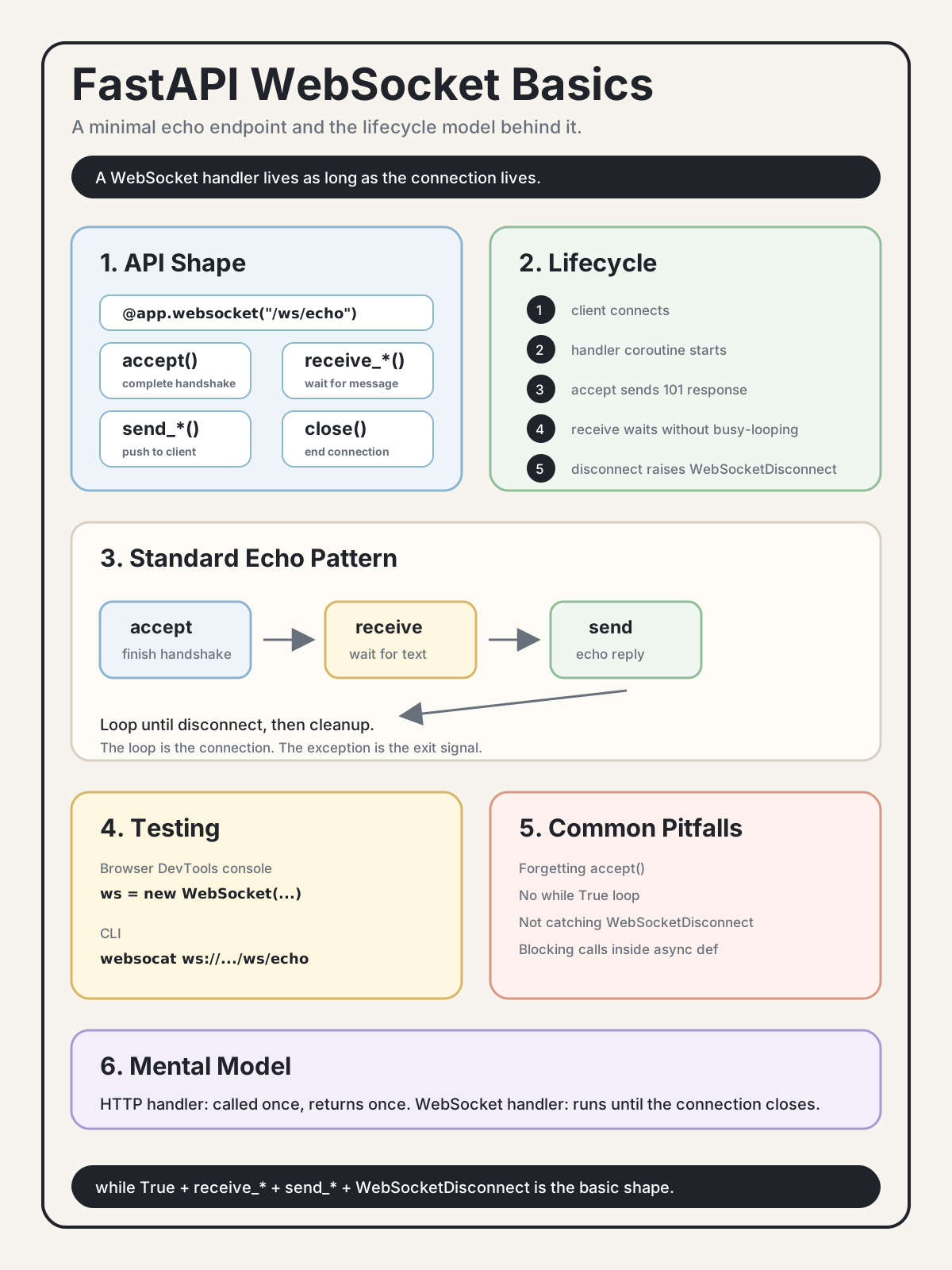
1. FastAPI WebSocket API Cheat Sheet
from fastapi import WebSocket, WebSocketDisconnect


@app.websocket("/path")
async def handler(websocket: WebSocket):
    await websocket.accept()

    data = await websocket.receive_text()
    await websocket.send_text("hello")

    await websocket.close()
Key differences from HTTP routes:
| HTTP Route | WebSocket Route |
|---|---|
@app.get("/path") |
@app.websocket("/path") |
| Function runs once and returns | Function keeps running until the connection closes |
No explicit accept step |
Must call await websocket.accept() |
return data |
await websocket.send_text/json/bytes(...) |
| Input comes from function parameters/body | Input comes from await websocket.receive_*() |
| Normal request exception behavior | Catch WebSocketDisconnect |
The biggest mental model shift is that the WebSocket handler is not a one-shot request handler. It is a coroutine tied to one live connection.
2. Lifecycle
Client connects
    ↓
FastAPI starts your handler function
    ↓
await websocket.accept()
    ↓
101 Switching Protocols is sent
    ↓
Business loop:
    while True:
        data = await receive_text()
        process data
        await send_text(reply)
    ↓
Client disconnects
    ↓
receive_text() raises WebSocketDisconnect
    ↓
except block runs
    ↓
function returns
    ↓
framework cleans up the connection
Core idea:
The handler function's lifecycle equals the connection's lifecycle.
That is fundamentally different from HTTP, where a function is called for one request and returns one response.
3. Minimal Echo Implementation
"""
WebSocket demo router.

The client sends a text message.
The server replies with "echo: " + the original text.
"""
from fastapi import APIRouter, WebSocket, WebSocketDisconnect

router = APIRouter(prefix="/ws", tags=["ws-demo"])


@router.websocket("/echo")
async def echo_endpoint(websocket: WebSocket):
    await websocket.accept()
    print("[ws-echo] client connected")

    try:
        while True:
            data = await websocket.receive_text()
            print(f"[ws-echo] received: {data!r}")

            reply = f"echo: {data}"
            await websocket.send_text(reply)
            print(f"[ws-echo] sent: {reply!r}")

    except WebSocketDisconnect:
        print("[ws-echo] client disconnected")
Line-by-Line Explanation
await websocket.accept() finishes the WebSocket handshake.
The client's HTTP Upgrade request has reached FastAPI. Calling accept() sends the 101 Switching Protocols response. If you do not call it, the WebSocket connection is not established correctly.
while True keeps the connection alive.
Without the loop, the handler receives one message, sends one reply, reaches the end of the function, and closes the connection. Most WebSocket handlers are long-running loops that exit through disconnects or explicit close logic.
await websocket.receive_text() waits for the next text message.
While it waits, the event loop is free to run other coroutines. The line may wait for seconds, minutes, or hours. If the client disconnects, this call raises WebSocketDisconnect.
await websocket.send_text(reply) sends a message to the client.
This is different from HTTP return. In a WebSocket connection, the server can send whenever it wants, not only as a response to a request.
except WebSocketDisconnect handles normal disconnects.
This is not a bug. It is how the framework tells your handler that the client disconnected. In real systems, this is where you remove the connection from any in-memory connection manager.
4. Design Choices
Loop vs One Message
This closes after one message:
async def handler(ws: WebSocket):
    await ws.accept()
    data = await ws.receive_text()
    await ws.send_text(f"echo: {data}")
This keeps the connection open:
async def handler(ws: WebSocket):
    await ws.accept()
    while True:
        data = await ws.receive_text()
        await ws.send_text(f"echo: {data}")
For most WebSocket handlers, while True is the standard shape. The loop exits through WebSocketDisconnect, a close frame, cancellation, or an application-level condition.
receive_text vs receive_json vs receive_bytes
| Method | Use Case | Result |
|---|---|---|
receive_text() |
Plain text messages | str |
receive_json() |
Structured JSON messages | Python object after JSON parsing |
receive_bytes() |
Binary messages | bytes |
receive() |
Low-level receive | ASGI event dict |
Real applications often use JSON messages because they need a message type and payload:
{
  "type": "comment_created",
  "data": {
    "comment_id": 42
  }
}
This note uses receive_text() only because echo is the smallest useful example.
Logging
WebSocket debugging is harder than HTTP debugging because one connection carries a continuous message stream.
At minimum, log:
- connection accepted
- message received
- message sent
- connection disconnected
Demo code can use print. Production code should use the logging module and include connection/user identifiers where appropriate.
Exception Handling
WebSocketDisconnect is the one exception you should expect.
Other exceptions depend on your application:
- Auth or policy failure: close with an application-defined code such as
4001. - Unexpected exception: let the framework close the connection, but still clean up your connection manager.
A safer shape uses finally:
try:
    while True:
        ...
except WebSocketDisconnect:
    print("disconnected")
finally:
    cleanup(websocket)
The finally block matters when you start tracking connected users.
5. How to Test
You do not need to build a frontend to test a WebSocket endpoint.
Option 1: Browser DevTools Console
Start the backend:
uvicorn app.main:app --reloadOpen any page, such as http://localhost:8000/docs, then open DevTools Console:
const ws = new WebSocket("ws://localhost:8000/ws/echo");
ws.onopen = () => console.log("connected");
ws.onmessage = (event) => console.log("recv:", event.data);
ws.onclose = (event) => console.log("closed:", event.code);

ws.send("hello");
ws.send("hi there");
ws.close();
Expected browser console:
connected
recv: echo: hello
recv: echo: hi there
closed: 1000
Expected backend logs:
[ws-echo] client connected
[ws-echo] received: 'hello'
[ws-echo] sent: 'echo: hello'
[ws-echo] received: 'hi there'
[ws-echo] sent: 'echo: hi there'
[ws-echo] client disconnected
Option 2: websocat
brew install websocat
websocat ws://localhost:8000/ws/echo
Then type messages and press enter.
Option 3: Python Client
import asyncio
import websockets


async def test():
    async with websockets.connect("ws://localhost:8000/ws/echo") as ws:
        await ws.send("hello")
        print(await ws.recv())


asyncio.run(test())
6. Common Pitfalls
Forgetting await websocket.accept()
@router.websocket("/echo")
async def handler(websocket: WebSocket):
    while True:
        data = await websocket.receive_text()
The client may hang or fail, and the backend can raise a runtime error. Always accept before receiving or sending.
Not Writing a Loop
async def handler(websocket: WebSocket):
    await websocket.accept()
    data = await websocket.receive_text()
    await websocket.send_text(f"echo: {data}")
This receives one message and then returns, closing the connection. Use while True for a persistent WebSocket.
Not Catching WebSocketDisconnect
async def handler(websocket: WebSocket):
    await websocket.accept()
    while True:
        data = await websocket.receive_text()
When the client disconnects, receive_text() raises WebSocketDisconnect. If you do not catch it, normal disconnects can look like application errors in logs or monitoring.
Calling Blocking Code Inside async def
import requests


async def handler(websocket: WebSocket):
    await websocket.accept()
    while True:
        data = await websocket.receive_text()
        result = requests.get("https://api.example.com")
        await websocket.send_text(result.text)
This blocks the event loop. While the synchronous request runs, other async routes and WebSocket connections in the same worker can be delayed.
Use async libraries instead, such as httpx.AsyncClient.
Route Prefix Confusion
If you define:
router = APIRouter(prefix="/ws")

@router.websocket("/echo")
async def echo_endpoint(websocket: WebSocket):
    ...
The final path is:
/ws/echoThe test URL is:
ws://localhost:8000/ws/echoIt is not /echo and not /ws.
7. WebSocket Route vs HTTP Route
# HTTP
@app.get("/posts/{post_id}")
def get_post(post_id: int):
    post = get_post_from_db(post_id)
    return post
HTTP route characteristics:
- called once per request
- returns once
- usually stateless at the handler level
- framework owns request/response lifecycle
# WebSocket
@app.websocket("/ws/echo")
async def echo_endpoint(websocket: WebSocket):
    await websocket.accept()
    try:
        while True:
            data = await websocket.receive_text()
            await websocket.send_text(f"echo: {data}")
    except WebSocketDisconnect:
        pass
WebSocket route characteristics:
- may run for hours or days
- connection is state
- handler must manage lifecycle
- disconnect is a normal event
8. Self-Check
- Why must
await websocket.accept()be called? - Why does a WebSocket handler usually use
while Trueinstead of one-shot logic? - Is
WebSocketDisconnecta bug or a normal event? - What is the difference between
receive_text()andreceive_json()? - What happens if you call
requests.get()inside anasync defWebSocket route? - What final URL comes from
APIRouter(prefix="/ws")plus@router.websocket("/echo")?
Answer Key
-
await websocket.accept()completes the WebSocket handshake. It sends the101 Switching Protocolsresponse. Without it, the WebSocket connection is not properly established. -
A WebSocket handler usually uses
while Truebecause the connection is long-lived. The handler should keep waiting for messages until the client disconnects or the server closes the connection. -
WebSocketDisconnectis a normal event. It means the client disconnected. Catch it so normal disconnects do not pollute logs and so cleanup code can run. -
receive_text()returns a plain string.receive_json()parses the incoming message as JSON and returns a Python object. If JSON parsing fails,receive_json()raises an error. -
Calling
requests.get()blocks the event loop. While it runs, other async work in the same worker can be delayed. Use an async HTTP client such ashttpx.AsyncClient. -
The final URL is
/ws/echo. The router prefix and route path are joined together, so the test URL isws://localhost:8000/ws/echo.
Key Insights
-
The WebSocket handler lifecycle equals the connection lifecycle. HTTP handlers run once and return. WebSocket handlers run until the connection closes.
-
while TrueplusWebSocketDisconnectis the standard FastAPI WebSocket shape. Receive in a loop, send when needed, catch disconnect, and clean up. -
You can test WebSocket without a frontend. Browser DevTools,
websocat, or a short Python client are enough. -
Server push is the core value. The server can call
send_text,send_json, orsend_byteswithout waiting for a new HTTP request. -
await websocket.receive_text()is not busy waiting. While the coroutine waits for a message, the event loop can run other tasks.
Next Step
This echo endpoint proves that the protocol works, but the server still does not know who is online or how to send a message to a specific user.
Next note: WebSocket Connection Manager