Network Layering Model
A compact poster explaining the TCP/IP five-layer model, where common protocols belong, how HTTPS travels through the stack, and how to debug network issues by layer.
This poster is a compact mental model for the TCP/IP five-layer stack. It focuses on the layers you touch most often as a backend or application engineer: application protocols, transport tradeoffs, TLS, IP routing, and the order to debug network failures.
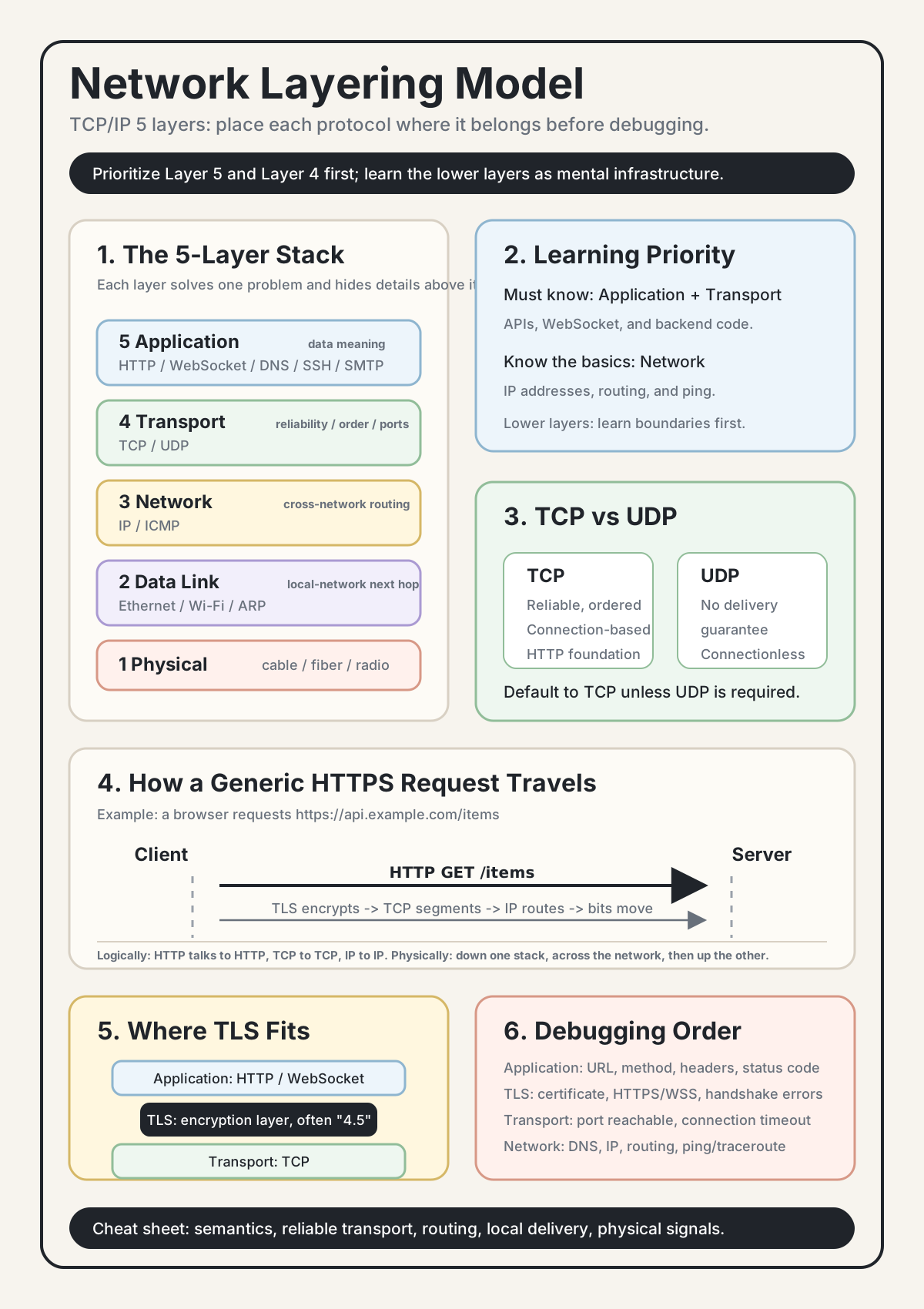
0. Learning Priority
You do not need to memorize every layer with the same depth at the beginning. Learn them in this order:
| Priority | Layer | Typical Protocols | What It Does |
|---|---|---|---|
| Must know | Layer 5: Application | HTTP, WebSocket, DNS | Where most backend and frontend code interacts with the network |
| Must know | Layer 4: Transport | TCP, UDP | Decides reliability, ordering, connections, and ports |
| Know the basics | Layer 3: Network | IP v4/v6 | Routes packets across networks using IP addresses |
| Basic awareness | Layer 2: Data Link | Ethernet, Wi-Fi | Moves frames inside a local network using MAC addresses |
| Basic awareness | Layer 1: Physical | Cables, fiber, radio | Turns bits into physical signals |
For backend work, being fluent in Layer 4 and Layer 5 is enough to start. The lower layers matter when you debug connectivity or reason about infrastructure, but you rarely implement them directly.
1. One-Screen Overview
┌─────────────────────────────┐
│ 5  Application              │  HTTP / WebSocket / DNS
├─────────────────────────────┤
│ 4  Transport                │  TCP / UDP
├─────────────────────────────┤
│ 3  Network                  │  IP
├─────────────────────────────┤
│ 2  Data Link                │  Ethernet / Wi-Fi
├─────────────────────────────┤
│ 1  Physical                 │  Cables / fiber / radio signals
└─────────────────────────────┘
The core idea is simple: each layer owns one problem and pretends the layers above and below are simpler than they really are.
2. Memory Models
Shipping Analogy
Think of sending a network message like shipping a package:
| Layer | Shipping Analogy | Decision |
|---|---|---|
| Application | What are you sending: a letter, a file, a gift? | What the data means |
| Transport | Should delivery be reliable and ordered? | TCP for reliable ordered delivery, UDP for lower overhead |
| Network | Which city should the package go to? | IP address and routing |
| Data Link | Which local neighbor gets the package next? | MAC address and local link |
| Physical | What medium carries the package? | Cable, fiber, Wi-Fi radio |
Bottom-Up Mnemonic
Physical -> Data Link -> Network -> Transport -> ApplicationYou can think of it like a building: physical media is the foundation, routing is the structure, and the application layer is the room where users actually do work.
English Mnemonic
Please Do Not Throw Apples
- Physical
- Data Link
- Network
- Transport
- Application
3. What Each Layer Does
Layer 5: Application
The application layer defines how applications talk to each other.
Common protocols:
- HTTP / HTTPS: web pages and APIs
- WebSocket / WSS: long-lived bidirectional communication
- DNS: domain name lookup
- SSE: server-to-client event streaming
- SMTP: email
- FTP: file transfer
- SSH: remote login
Most backend code lives at this layer:
# Most backend code works at the application layer.
@app.get("/api/posts")
def get_posts():
    ...

@app.websocket("/ws")
async def ws_endpoint(websocket):
    ...
Layer 4: Transport
The transport layer moves data between processes on two machines, either reliably or with lower overhead.
| TCP | UDP | |
|---|---|---|
| Reliability | Guarantees delivery through retransmission | Does not guarantee delivery |
| Ordering | Preserves order | May arrive out of order |
| Speed | More overhead due to connection state and congestion control | Lower overhead |
| Connection | Connection-oriented | Connectionless |
| Common uses | HTTP, WebSocket, SSH, email | DNS, video calls, games |
Default to TCP unless you know why UDP is the better fit.
Layer 3: Network
The network layer handles routing across networks. It decides how data gets from your machine to another machine, possibly through many routers.
The main protocol here is IP:
- IPv4 looks like
192.168.1.1 - IPv6 is longer and designed for a much larger address space
Key concepts:
- Devices communicate through IP addresses.
- Routers decide the next hop based on the destination IP.
- IP itself does not guarantee reliable delivery. Packets can be lost, duplicated, or reordered, which is why TCP adds reliability above it.
Layer 2: Data Link
The data link layer moves data inside the same local network. For example, between your laptop and your home router.
Common technologies:
- Ethernet for wired local networks
- Wi-Fi for wireless local networks
Key concepts:
- It uses MAC addresses, not IP addresses, for local delivery.
- It only cares about local-network movement. Once traffic leaves your router, another link-layer hop takes over.
Layer 1: Physical
The physical layer turns bits into real signals:
- Ethernet cable -> electrical signals
- Fiber -> light signals
- Wi-Fi -> radio waves
Most software engineers rarely touch this layer directly unless they work on hardware, embedded systems, or low-level networking.
4. How an HTTPS Request Moves Through the Layers
Imagine the browser requests:
https://api.example.com/itemsThe flow looks like this:
Browser                                           API Server
═══════                                           ══════════
Application   HTTP GET /items                    Parse GET /items
     ↓                                               ↑
TLS           Encrypt HTTP content                Decrypt back to HTTP
     ↓                                               ↑
Transport     TCP segments, sequence numbers      TCP reassembles and acknowledges
     ↓                                               ↑
Network       IP adds destination address         IP checks whether packet is for me
     ↓                                               ↑
Data Link     Ethernet/Wi-Fi adds MAC frame       Data link removes local frame
     ↓                                               ↑
Physical      Bits become signals ───────────→    Signals become bits again
Each layer behaves as if it talks to the same layer on the other side. Browser HTTP talks to server HTTP. Browser TCP talks to server TCP. In reality, the data travels down the sender's stack, crosses the network, and travels up the receiver's stack.
That is the value of layering: logical peers, physical stack traversal.
5. Where TLS Fits
TLS, the security layer behind HTTPS and WSS, does not fit cleanly into one traditional layer. In practice, it sits between the application layer and the transport layer:
Application layer: HTTP / WebSocket
        ↕
TLS encryption layer
        ↕
Transport layer: TCP
What TLS does:
- Application data goes down to TLS.
- TLS encrypts it.
- TCP sends the encrypted bytes.
- On the receiving side, TCP delivers encrypted bytes to TLS.
- TLS decrypts them and gives the original application data back to HTTP or WebSocket.
So:
- HTTPS = HTTP + TLS
- WSS = WebSocket + TLS
The S means the application protocol is protected by TLS.
6. Common Protocols by Layer
Application: HTTP, HTTPS, WebSocket, WSS, DNS, SSE, SMTP, SSH
TLS layer:   TLS / SSL
Transport:  TCP, UDP
Network:    IP, ICMP
Data Link:  Ethernet, Wi-Fi, ARP
Physical:   Cables, fiber, radio, electrical signals
Whether you are writing backend APIs, frontend requests, WebSocket handlers, Redis clients, or database integrations, most application code sits at Layer 5. The lower layers are infrastructure handled by the OS, network stack, router, NIC, and physical medium.
7. Important Correction: TCP/IP Is Not One Layer
People often say "TCP/IP protocol" or "TCP/IP layer," but that shorthand can be misleading.
| Term | What It Actually Means |
|---|---|
| TCP/IP | The broader internet protocol suite or five-layer model |
| TCP | A Layer 4 transport protocol |
| IP | A Layer 3 network protocol |
The whole model is called TCP/IP because TCP and IP are two of the most important protocols in the internet stack. But strictly speaking, the TCP/IP suite also includes many other protocols, such as HTTP, DNS, UDP, ICMP, ARP, Ethernet-related technologies, and more.
8. Why the Model Matters
Debugging by Layer
When a website or API does not work, debug from the top down:
Application: Is the URL, method, route, header, or status code wrong?
    ↓
TLS: Is the certificate expired? Did I use ws instead of wss?
    ↓
Transport: Can the TCP port be reached? Is the connection timing out?
    ↓
Network: Does DNS resolve? Can the IP be reached? What does traceroute show?
    ↓
Data Link: Is the local network working?
    ↓
Physical: Is the machine actually connected?
Layering gives debugging a sequence. Without it, network troubleshooting becomes random guessing.
Architecture by Layer
Layering also helps with design decisions:
- Real-time communication is an application-layer choice: WebSocket, SSE, long polling, or regular HTTP polling.
- Firewall traversal often depends on using TLS over port 443, which looks like normal HTTPS traffic.
- Performance debugging depends on locating the slow layer: DNS lookup, TLS handshake, TCP connection setup, server processing, or response streaming.
Interview Reasoning
If someone asks how WebSocket relates to HTTP, a layered answer is precise:
WebSocket is an application-layer protocol. It starts with an HTTP request and uses the HTTP Upgrade mechanism to switch the connection to the WebSocket protocol.
That is clearer than saying WebSocket "replaces" HTTP.
9. OSI 7 Layers vs TCP/IP 5 Layers
Many textbooks introduce the OSI seven-layer model. The TCP/IP five-layer model is more common in practical engineering discussions.
| OSI Layer | OSI 7-Layer Model | TCP/IP 5-Layer Model |
|---|---|---|
| 7 | Application | Application |
| 6 | Presentation | Application |
| 5 | Session | Application |
| 4 | Transport | Transport |
| 3 | Network | Network |
| 2 | Data Link | Data Link |
| 1 | Physical | Physical |
The five-layer TCP/IP model merges OSI application, presentation, and session concerns into one application layer. OSI is useful as a theory model; TCP/IP is closer to the way internet systems are usually discussed in practice.
10. Quick Reference
| Protocol | Layer |
|---|---|
| HTTP, HTTPS | Application, Layer 5 |
| WebSocket, WSS | Application, Layer 5 |
| DNS | Application, Layer 5 |
| SMTP | Application, Layer 5 |
| SSH | Application, Layer 5 |
| TLS / SSL | Between application and transport |
| TCP | Transport, Layer 4 |
| UDP | Transport, Layer 4 |
| IP v4/v6 | Network, Layer 3 |
| ICMP | Network, Layer 3 |
| ARP | Data Link, Layer 2 |
| Ethernet, Wi-Fi | Data Link, Layer 2 |
Key Insights
-
Layering is division of responsibility. Each layer solves one kind of problem and hides details from the layer above it. This is a general engineering pattern, not just a networking concept.
-
Same-layer peers are logical, not physical. Browser HTTP appears to talk directly to server HTTP, but the bytes still travel down the full sender stack and up the full receiver stack.
-
Protocol names often hint at the layer. TCP is about transmission control at the transport layer. IP is about internet addressing and routing at the network layer.
-
Modern protocols sometimes bend the layers. HTTP/2 brings stream management into the application layer. HTTP/3 replaces TCP with QUIC over UDP. The model is still useful, but real systems optimize across boundaries.
-
TCP/IP is the protocol suite, not a single protocol. TCP is Layer 4. IP is Layer 3. TCP/IP names the broader internet stack.
Self-Check
If you can answer these, the model is starting to stick:
- Which layer contains HTTP, WebSocket, TCP, IP, and Ethernet?
- Where does TLS sit, and why is it awkward to assign it to one strict layer?
- How does the shipping-package analogy map to the five network layers?
- What does "TCP/IP" mean?
- Why do we say WebSocket upgrades from HTTP rather than replacing HTTP?
Answer Key
-
HTTP and WebSocket are Layer 5 application protocols. TCP is Layer 4 transport. IP is Layer 3 network. Ethernet is Layer 2 data link.
-
TLS sits between the application layer and the transport layer. It is awkward to assign to one strict layer because it encrypts application data before TCP sends it, but it is not itself an application protocol like HTTP or a transport protocol like TCP. In practice, people often describe it as a "4.5 layer."
-
Shipping-package analogy: the application layer is the package content, the transport layer decides whether delivery must be reliable and ordered, the network layer chooses the destination address and route, the data link layer handles the next local hop, and the physical layer is the medium carrying the package.
-
TCP/IP means the broader internet protocol suite or five-layer model. TCP is one Layer 4 protocol, IP is one Layer 3 protocol, and "TCP/IP" names the larger stack built around them.
-
WebSocket upgrades from HTTP because the connection starts as an HTTP request. The client asks the server to switch protocols using the HTTP Upgrade mechanism. After the upgrade succeeds, the same underlying TCP connection carries WebSocket frames instead of normal HTTP request-response traffic.