Parking Lot OOD Basics
An entry-level object-oriented design note for a parking lot system, focused on vehicles, spots, and simple spot assignment.
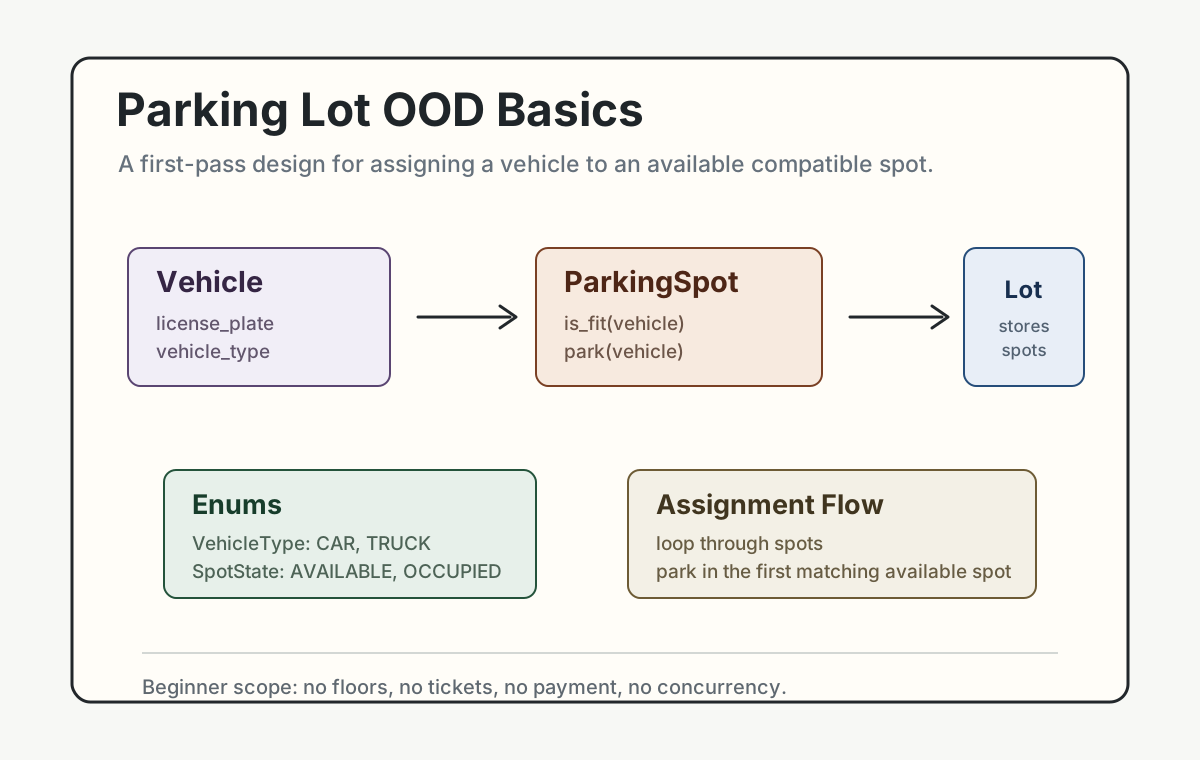
Parking lot is a good first OOD interview problem because the domain is easy to understand. A vehicle enters, the system checks available spots, and the vehicle gets assigned to a compatible spot.
This note keeps the design intentionally small. It does not support floors, tickets, payment, or concurrency yet. The goal is to practice the most basic OOD habit: identify the objects, give each object one clear responsibility, and connect them through simple methods.
Requirements
- Design a simple parking lot system that can accept incoming vehicles.
- The system should support at least two vehicle types: cars and trucks.
- The parking lot has parking spots, and each spot supports one vehicle type.
- When a vehicle enters, assign it to an available compatible spot.
- If no compatible spot is available, the system should report that no spot can be assigned.
Before writing classes, clarify the exact scope:
- What vehicle types should be supported in this version?
- Does each spot support exactly one vehicle type, or can some vehicles use multiple spot types?
- Does the parking lot have floors, or can we model it as one flat collection of spots?
- Should the system only handle vehicle entry, or should it also handle vehicle exit?
- Do we need tickets and payment now, or can they be follow-up features?
For this beginner version, the answer is simple:
- support only cars and trucks
- model the lot as one collection of spots
- assign the first available compatible spot
- require exact matching between vehicle type and spot type
- handle entry only, not exit, ticketing, or payment
- return
Nonewhen no spot is available
Classes
This design only needs three main classes:
ParkingLotParkingSpotVehicle
It also uses two enums:
VehicleTypeSpotState
VehicleType
VehicleType defines the vehicle categories supported by the system.
class VehicleType(Enum):
    CAR = "car"
    TRUCK = "truck"
Using an enum avoids passing random strings such as "Car", "car", or "truck " around the system.
SpotState
SpotState defines whether a spot is available or occupied.
class SpotState(Enum):
    AVAILABLE = "available"
    OCCUPIED = "occupied"
This makes the spot status explicit.
Vehicle
Vehicle represents the car or truck trying to park.
class Vehicle:
    def __init__(self, license_plate: str, vehicle_type: VehicleType) -> None:
        self.license_plate = license_plate
        self.vehicle_type = vehicle_type
Its responsibility is small:
- store the license plate
- store the vehicle type
ParkingSpot
ParkingSpot represents one physical spot.
class ParkingSpot:
    def __init__(self, spot_id: str, allowed_vehicle_type: VehicleType) -> None:
        self.spot_id = spot_id
        self.allowed_vehicle_type = allowed_vehicle_type
        self.state = SpotState.AVAILABLE
        self.current_vehicle = None

    def is_fit(self, vehicle: Vehicle) -> bool:
        return (
            self.state == SpotState.AVAILABLE
            and self.allowed_vehicle_type == vehicle.vehicle_type
        )

    def park(self, vehicle: Vehicle) -> None:
        self.current_vehicle = vehicle
        self.state = SpotState.OCCUPIED
Its responsibility is:
- know what vehicle type it accepts
- know whether it is available
- decide whether a vehicle can fit
- mark itself occupied when a vehicle parks
The key method is is_fit(vehicle). It checks two things:
- The spot is available.
- The spot accepts this vehicle type.
ParkingLot
ParkingLot manages all spots and assigns one to a vehicle.
class ParkingLot:
    def __init__(self) -> None:
        self.spots = []

    def add_spot(self, spot: ParkingSpot) -> None:
        self.spots.append(spot)

    def assign_spot(self, vehicle: Vehicle):
        for spot in self.spots:
            if spot.is_fit(vehicle):
                spot.park(vehicle)
                return spot

        return None
Its responsibility is:
- store all parking spots
- search for an available compatible spot
- park the vehicle in the first matching spot
- return
Noneif no spot can be assigned
Main Flow
The demo creates one car spot, one truck spot, and then tries to park three vehicles.
if __name__ == "__main__":
    lot = ParkingLot()

    lot.add_spot(ParkingSpot("A1", VehicleType.CAR))
    lot.add_spot(ParkingSpot("B1", VehicleType.TRUCK))

    car = Vehicle("ABC123", VehicleType.CAR)
    truck = Vehicle("TRK999", VehicleType.TRUCK)
    second_car = Vehicle("XYZ888", VehicleType.CAR)

    car_spot = lot.assign_spot(car)
    truck_spot = lot.assign_spot(truck)
    second_car_spot = lot.assign_spot(second_car)

    print(car_spot.spot_id if car_spot else "No spot for car")
    print(truck_spot.spot_id if truck_spot else "No spot for truck")
    print(second_car_spot.spot_id if second_car_spot else "No spot for second car")
Expected result:
- the first car parks in
A1 - the truck parks in
B1 - the second car gets no spot because the only car spot is already occupied
Interview Explanation
A simple interview explanation:
I used
Vehicleto represent the thing entering the parking lot,ParkingSpotto represent one spot and its state, andParkingLotto manage all spots. When a vehicle enters,ParkingLot.assign_spot()loops through the spots, asks each spot whether it fits the vehicle, parks the vehicle in the first matching spot, and returns that spot.
This is enough for a beginner version because the classes map directly to the problem nouns, and the flow is easy to explain.
Follow-up Ideas
Once the basic version is clear, the next improvements could be:
- add parking floors
- add tickets
- add
release()when a vehicle leaves - add payment
- handle concurrent requests from multiple gates
These are useful follow-ups, but they do not need to be part of the first answer.