WebSocket Connection Manager
A WebSocket connection manager lets the backend remember who is connected, push to a specific user, broadcast to everyone, and clean up disconnected sockets.
This is the third note in the WebSocket series.
Previous note: FastAPI WebSocket Handler Lifecycle
The goal here is to make the server remember who is connected. Once the server can track connected users, it can push messages to one user, broadcast to everyone, and expose basic online presence.
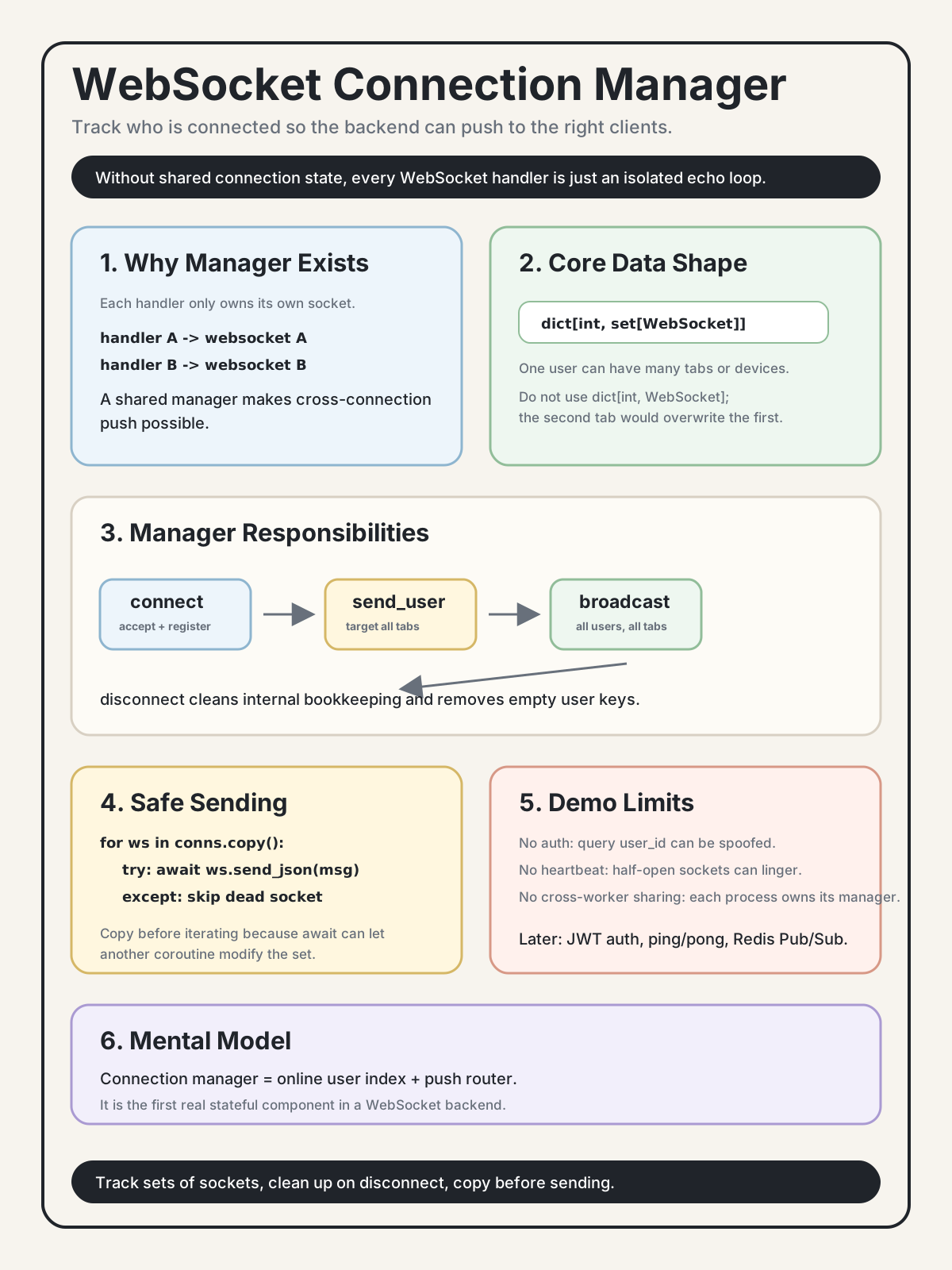
1. Why a Connection Manager Is Needed
The echo endpoint from the previous note has a fundamental limitation: each handler only knows about its own websocket object.
@router.websocket("/echo")
async def echo_endpoint(websocket: WebSocket):
    await websocket.accept()
    while True:
        data = await websocket.receive_text()
        await websocket.send_text(f"echo: {data}")
        # This websocket belongs only to the current connection.
        # Other connections live inside other handler calls.
With only isolated handlers, the server cannot:
- send a message from user A to user B
- push a notification from an HTTP route to a connected user
- broadcast a message to everyone
- know who is currently online
The solution is a shared object that records which user owns which WebSocket connections:
manager = {
    user_1: {websocket_a},
    user_2: {websocket_b, websocket_c},
}
That shared object is the ConnectionManager.
2. Design Requirements
One User Can Have Multiple Connections
A user may open multiple browser tabs, use a phone and laptop at the same time, or reconnect before an old socket is fully cleaned up.
This design is wrong:
connections: dict[int, WebSocket] = {}If user 1 opens two tabs, the second tab overwrites the first:
connections[1] = ws_a
connections[1] = ws_b  # ws_a is now lost
Use a set per user instead:
connections: dict[int, set[WebSocket]] = {}

connections.setdefault(1, set()).add(ws_a)
connections.setdefault(1, set()).add(ws_b)
Now sending to user 1 means sending to all of that user's active connections.
Disconnect Must Clean Up State
When a client disconnects, the manager must remove that socket from the dictionary.
If it does not:
- memory leaks accumulate
- later sends may target dead sockets
- online presence becomes wrong
Cleanup should remove the socket from the user's set and remove the whole user key when the last socket is gone:
def disconnect(self, user_id: int, ws: WebSocket) -> None:
    conns = self._connections.get(user_id)
    if conns:
        conns.discard(ws)
        if not conns:
            del self._connections[user_id]
discard is useful because it does not raise if the socket is already absent.
Copy Before Iterating
This is dangerous:
for ws in self._connections[user_id]:
    await ws.send_json(message)
The await gives control back to the event loop. While this coroutine is waiting, another coroutine may disconnect a socket and mutate the same set.
Use a defensive copy:
for ws in self._connections[user_id].copy():
    await ws.send_json(message)
or:
targets = list(self._connections[user_id])
for ws in targets:
    await ws.send_json(message)
Sending Should Not Fail the Whole Group
One dead socket should not prevent delivery to every other connection.
async def send_to_user(self, user_id: int, message: dict) -> None:
    for ws in self._connections.get(user_id, set()).copy():
        try:
            await ws.send_json(message)
        except Exception as exc:
            print(f"[manager] send_to_user({user_id}) failed: {exc}")
Production code should also remove the failed socket, but this demo keeps the failure handling simple.
3. ConnectionManager Implementation
from fastapi import WebSocket


class ConnectionManager:
    def __init__(self):
        # user_id -> all active WebSocket connections for that user
        self._connections: dict[int, set[WebSocket]] = {}

    async def connect(self, user_id: int, ws: WebSocket) -> None:
        await ws.accept()
        self._connections.setdefault(user_id, set()).add(ws)

    def disconnect(self, user_id: int, ws: WebSocket) -> None:
        conns = self._connections.get(user_id)
        if conns:
            conns.discard(ws)
            if not conns:
                del self._connections[user_id]

    async def send_to_user(self, user_id: int, message: dict) -> None:
        for ws in self._connections.get(user_id, set()).copy():
            try:
                await ws.send_json(message)
            except Exception as exc:
                print(f"[manager] send_to_user({user_id}) failed: {exc}")

    async def broadcast(self, message: dict) -> None:
        for user_id, conns in list(self._connections.items()):
            for ws in conns.copy():
                try:
                    await ws.send_json(message)
                except Exception as exc:
                    print(f"[manager] broadcast to user {user_id} failed: {exc}")

    def is_online(self, user_id: int) -> bool:
        return user_id in self._connections

    @property
    def online_users(self) -> list[int]:
        return sorted(self._connections.keys())


manager = ConnectionManager()
This manager is a single-process object. If the app runs with multiple workers, each worker has its own manager. Cross-worker messaging requires a shared broker such as Redis Pub/Sub, which belongs in a later note.
4. Chat Endpoint Example
For this demo, user_id comes from the query string:
from fastapi import WebSocket, WebSocketDisconnect


@router.websocket("/chat")
async def chat_endpoint(websocket: WebSocket, user_id: int):
    was_offline = not manager.is_online(user_id)
    await manager.connect(user_id, websocket)

    try:
        if was_offline:
            await manager.broadcast({
                "type": "presence",
                "event": "online",
                "user_id": user_id,
                "online_users": manager.online_users,
            })

        while True:
            data = await websocket.receive_json()

            if data["type"] == "broadcast":
                await manager.broadcast({
                    "type": "broadcast",
                    "from": user_id,
                    "message": data["message"],
                })

            elif data["type"] == "private":
                target_user_id = data["to"]
                if not manager.is_online(target_user_id):
                    await websocket.send_json({
                        "type": "error",
                        "message": f"user {target_user_id} not online",
                    })
                    continue

                await manager.send_to_user(target_user_id, {
                    "type": "private",
                    "from": user_id,
                    "message": data["message"],
                })

    except WebSocketDisconnect:
        manager.disconnect(user_id, websocket)
        if not manager.is_online(user_id):
            await manager.broadcast({
                "type": "presence",
                "event": "offline",
                "user_id": user_id,
                "online_users": manager.online_users,
            })
The presence broadcasts only fire on state transitions: offline to online, and online to offline. If the same user has two tabs open and closes one tab, the user still has another active socket, so the demo does not announce that user as offline.
FastAPI parses this automatically:
ws://localhost:8000/ws/chat?user_id=1into:
user_id: intThis is intentionally simple for the demo. In a real app, user_id should come from a verified token, not a query string that anyone can spoof.
5. How to Test
Start the backend:
uvicorn app.main:app --reloadOpen three browser tabs. In each tab, change userId to 1, 2, and 3:
const userId = 1;

const ws = new WebSocket(`ws://localhost:8000/ws/chat?user_id=${userId}`);
ws.onopen = () => console.log(`user ${userId} connected`);
ws.onmessage = (event) => console.log("recv:", JSON.parse(event.data));
ws.onclose = (event) => console.log("closed:", event.code);
window.ws = ws;
Broadcast
In any tab:
ws.send(JSON.stringify({
  type: "broadcast",
  message: "hello everyone"
}));
All connected tabs should receive:
{
  "type": "broadcast",
  "from": 1,
  "message": "hello everyone"
}
Private Message
In user 1's tab:
ws.send(JSON.stringify({
  type: "private",
  to: 2,
  message: "hello user 2"
}));
Only user 2 should receive:
{
  "type": "private",
  "from": 1,
  "message": "hello user 2"
}
User 3 should receive nothing.
Presence
Close user 3's tab. The remaining tabs should receive an offline event:
{
  "type": "presence",
  "event": "offline",
  "user_id": 3,
  "online_users": [1, 2]
}
Offline User
Try sending to user 99:
ws.send(JSON.stringify({
  type: "private",
  to: 99,
  message: "are you there?"
}));
The sender should receive:
{
  "type": "error",
  "message": "user 99 not online"
}
Same User, Multiple Tabs
Open two tabs with user_id=1. When a broadcast happens, both user 1 tabs should receive it because the manager stores a set of connections per user.
If you close only one of those two tabs, no offline presence event should be emitted for user 1. The user is still online through the remaining tab.
6. Current Limits
No Authentication
Anyone can claim any user id:
new WebSocket("ws://localhost:8000/ws/chat?user_id=1")A real system should verify a token and derive user_id from that token.
No Heartbeat
If a client becomes half-open, the socket may stay in the manager until the TCP stack notices. A later heartbeat note should add ping/pong and timeout cleanup.
No Cross-Worker Messaging
The manager is a Python object inside one process.
If the app runs with four workers:
worker 1 -> manager 1
worker 2 -> manager 2
worker 3 -> manager 3
worker 4 -> manager 4
User 1 may connect to worker 1, while user 2 connects to worker 2. Worker 1 cannot see worker 2's in-memory manager.
Redis Pub/Sub or another shared message broker is needed for cross-process fanout.
7. Self-Check
- Why use
dict[int, set[WebSocket]]instead ofdict[int, WebSocket]? - Why should
disconnectdelete the whole user key when the last socket is removed? - Why use
for ws in conns.copy()instead of iterating overconnsdirectly? - Is the global
managersafe without locks in this demo? What is the boundary of that assumption? - After adding authentication, should
user_idstill come from the query string?
Answer Key
-
Use
dict[int, set[WebSocket]]because one user can have multiple live connections. A singleWebSocketvalue would be overwritten by a second tab or device. -
Delete the user key when the last socket is removed to avoid stale online presence and memory leaks. If the set is empty, the user is no longer online in this worker.
-
Copy before iterating because sending includes
await. While this coroutine is waiting, another coroutine may disconnect a socket and mutate the original set. -
The global manager is acceptable for a single-process, single-event-loop demo because normal dict mutations are not interrupted except at
awaitpoints. It is not a cross-worker solution, and it is not enough if multiple threads or processes share state. -
After authentication,
user_idshould come from a verified token, not from the query string. The client can send a token, the server verifies it, and the server derives the user id.
Key Insights
-
Connection manager is the first real stateful component in a WebSocket backend. Without it, the app is just isolated echo handlers.
-
A user is not the same thing as a connection. One user can have multiple tabs, devices, and reconnects.
-
Disconnect cleanup is mandatory. Python will not automatically remove a WebSocket from your manager when the client disappears.
-
Defensive copies prevent async iteration bugs. If a loop awaits while iterating a mutable set, another coroutine can change that set.
-
This manager is only single-process. Real multi-worker delivery needs a shared event layer such as Redis Pub/Sub.
Next Step
The next topic is WebSocket authentication: replacing query-string user_id with a verified token so users cannot impersonate each other.