FastAPI Concurrency Implementation
How FastAPI actually runs sync and async routes: Uvicorn worker processes, one event-loop thread, AnyIO's thread pool, database pool sizing, and deployment traps.
This note pairs with Python Backend Concurrency Model. That post covers the general concepts. This one focuses on the concrete FastAPI / Uvicorn / Starlette / AnyIO implementation details.
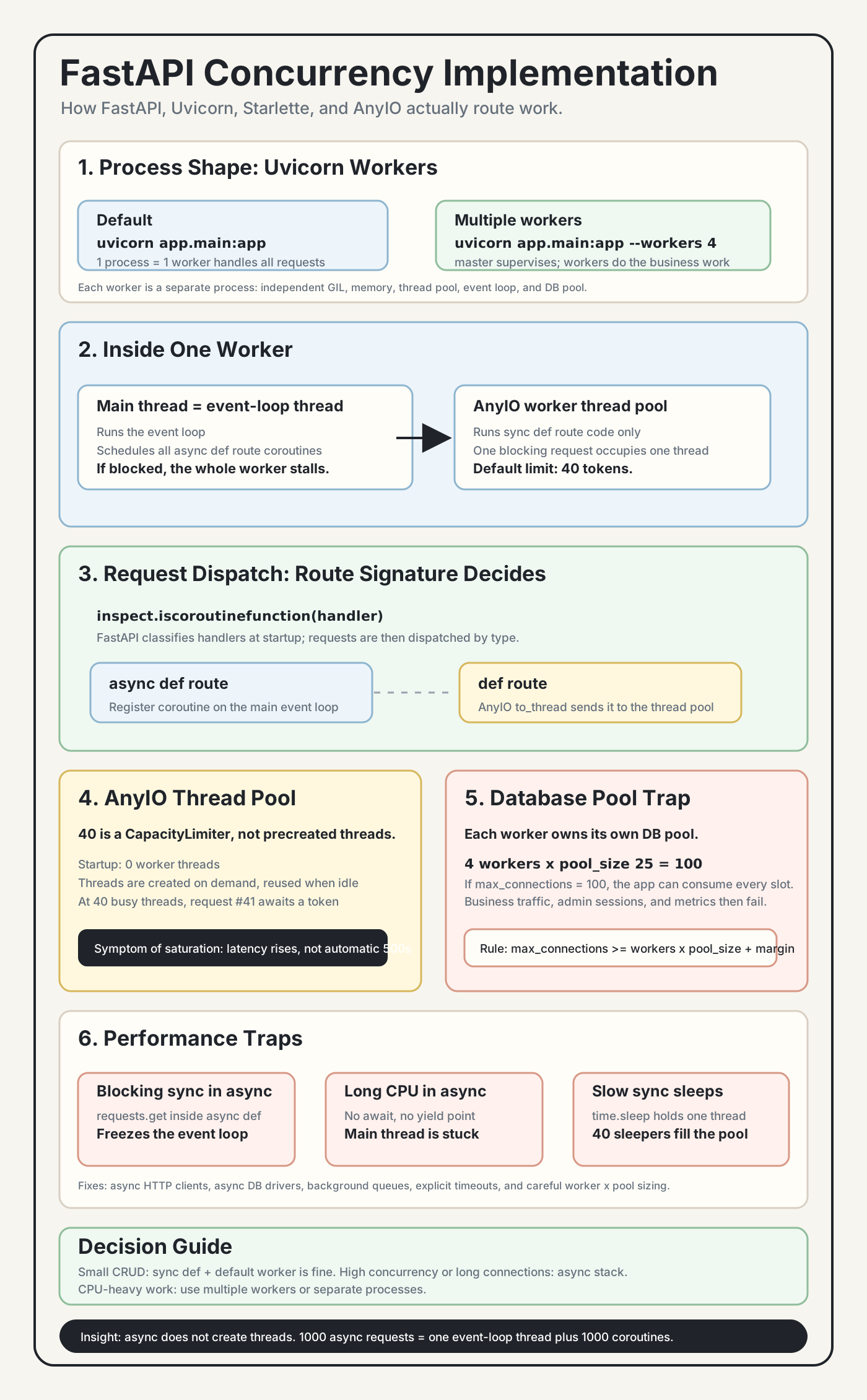
1. Overall Architecture
Uvicorn can run one worker process or multiple worker processes:
uvicorn app.main:app
uvicorn app.main:app --workers 4
Default, one worker:
uvicorn process (= 1 worker)
└── handles all requests
Multiple workers:
uvicorn master process
├── does not handle business requests
└── forks N independent worker processes
    ├── worker #1: own GIL, memory, thread pool, event loop
    ├── worker #2: own GIL, memory, thread pool, event loop
    └── ...
Key points:
- Each worker is a separate process, so multiple workers bypass the GIL for true parallelism.
- Workers do not share memory. Shared state must go through a database, Redis, files, or another external system.
- The master process supervises and restarts workers. It does not run business logic.
2. Inside One Worker Process
worker process
|
├── main thread = event-loop thread (one fixed thread)
|   └── coroutine set, created as needed
|       ├── coroutine A: handles one async def request
|       ├── coroutine B: handles another async def request
|       └── ...
|
└── worker thread pool, managed by AnyIO
    ├── thread #1: runs one def route
    ├── thread #2: runs another def route
    ├── ...
    └── default limit: 40
The main thread is not a guard thread. It is the core scheduler:
- It runs the event loop.
- It schedules all
async defroute coroutines. - It dispatches
defroutes to the worker thread pool.
If the main thread is blocked, the whole worker process is effectively stalled. That includes def routes, because nobody is available to dispatch them.
The worker thread pool only runs synchronous def route code. One request occupies one worker thread from start to finish, including the time spent waiting on synchronous database calls or external APIs.
3. Request Dispatch
FastAPI classifies route handlers by inspecting their function signature, effectively using:
inspect.iscoroutinefunction(handler)This classification is done at startup. During request handling, FastAPI dispatches by the already-known route type:
request arrives
    |
    v
is the route async def?
    |
    ├─ yes -> register a new coroutine on the main event loop
    |        thread count unchanged, coroutine count +1
    |
    └─ no  -> use AnyIO to_thread to dispatch into the worker thread pool
wait for a token, then reuse or create a worker thread| Dimension | Sync route: def |
Async route: async def |
|---|---|---|
| Runs where | Worker thread pool | Main thread, as an event-loop coroutine |
| Occupies | 1 OS thread, roughly MB-level stack | 1 coroutine object, usually KB-level |
| Default concurrency bound | 40 AnyIO tokens | Mostly memory and downstream resources |
| Blocking impact | Holds only that worker thread | Blocks the whole worker event loop |
| I/O libraries | Use sync libraries such as psycopg2 or requests | Use async libraries such as asyncpg or httpx |
4. AnyIO Worker Thread Pool
FastAPI runs on Starlette, and Starlette uses AnyIO for thread offloading. AnyIO's default thread limiter is 40.
Conceptually, the default comes from a capacity limiter:
def current_default_thread_limiter(cls) -> CapacityLimiter:
    try:
        return _default_thread_limiter.get()
    except LookupError:
        limiter = CapacityLimiter(40)
        ...
The number 40 is a CapacityLimiter, not 40 pre-created threads.
AnyIO keeps track of idle workers and live workers:
_threadpool_idle_workers
_threadpool_workers
Lifecycle:
request needs a thread
    |
    v
check idle queue
    |
    ├─ idle worker exists -> reuse it
    |
    └─ no idle worker
        |
        ├─ current worker count < 40 -> create a WorkerThread
        └─ current worker count = 40 -> await a limiter token
                                      until a worker becomes available

request finishes
    |
    └─ thread returns to idle queue and is reused later
Important facts:
- Startup begins with zero worker threads.
- Threads are created on demand.
- Threads are reused after requests finish.
- The 41st simultaneous blocking request does not automatically fail. It waits in the event loop for a token, so latency rises.
You can tune the limiter:
from anyio import to_thread

@app.on_event("startup")
async def configure_threadpool():
    limiter = to_thread.current_default_thread_limiter()
    limiter.total_tokens = 100
Tune it when:
- The thread pool is frequently saturated.
- I/O-bound sync requests are slow because of database calls or external APIs.
- Monitoring shows long waits for thread tokens.
Do not treat it as free capacity:
- Every extra thread costs memory.
- More sync concurrency can overload database connection pools.
- More threads do not solve CPU-bound Python work under the GIL.
5. Database Connection Pool Trap
Each worker process owns its own SQLAlchemy engine and database connection pool.
Example:
PostgreSQL max_connections = 100

4 workers
pool_size = 25 per worker

4 x 25 = 100 persistent connections
That already consumes the whole database connection budget. Real traffic, admin sessions, metrics, migrations, and temporary overflow connections can push the database over the limit.
Rule:
DB max_connections >= workers x per_worker_pool_size + safety_marginPrefer explicit SQLAlchemy pool settings before production:
engine = create_engine(
    DATABASE_URL,
    pool_size=10,
    max_overflow=10,
    pool_timeout=30,
    pool_recycle=3600,
)
6. Performance Traps
Trap 1: calling a blocking sync library inside async def
async def get_data():
    data = requests.get("https://api.com")
    return data
This blocks the main event-loop thread. All coroutines in that worker freeze.
Fix it with an async HTTP client such as httpx.AsyncClient or aiohttp, and make the I/O point explicit with await:
import httpx

async def get_data():
    async with httpx.AsyncClient(timeout=5.0) as client:
        response = await client.get("https://api.com")
        response.raise_for_status()
        return response.json()
The important difference is that await client.get(...) lets the event loop run other coroutines while the HTTP request is waiting on the network. The timeout is also important: without it, a slow upstream service can hold the request open for too long.
Trap 2: running long CPU work inside async def
async def heavy():
    result = sum(i * i for i in range(10**8))
    return result
There is no await, so the main thread stays busy.
A short-term offload:
async def heavy():
    result = await asyncio.to_thread(
        lambda: sum(i * i for i in range(10**8))
    )
    return result
For truly CPU-bound work, use multiple processes or a background worker system.
Trap 3: long time.sleep() inside a sync route
def my_route():
    time.sleep(60)
This holds one worker thread for 60 seconds. If 40 requests do this, the 41st waits for the AnyIO limiter.
Fix it by making the operation truly async, adding a background queue such as Celery or RQ, or avoiding long blocking work inside request handlers.
Trap 4: workers x pool_size exceeds the database limit
This is the database pool trap from the previous section. Always size the database pool by multiplying per-worker settings by worker count.
7. Decision Table
What kind of app is this?
|
├─ Simple CRUD, small concurrency
|   └─ sync def routes + default 1 worker
|
├─ Medium traffic, hundreds of concurrent requests
|   ├─ I/O-bound -> sync routes + multiple workers
|   └─ CPU-bound -> multiple workers, close to CPU core count
|
├─ High concurrency, thousands of concurrent requests
|   └─ async def routes + async libraries
|
└─ Long connections, WebSocket or SSE
    └─ async is required; thread pools do not scale well here
Worker count heuristics:
| App type | Worker count | Reason |
|---|---|---|
| CPU-bound | Close to CPU core count | One process per core, bypasses the GIL |
| I/O-bound sync | 2-4 | Each worker already has a thread pool |
| I/O-bound async | 2-4 | One event loop can hold many waiting coroutines |
8. Current Project Mode
If all routes under backend/app/routers/ are def, the app is currently in this mode:
pure sync + thread pool

startup:
  1 process
  1 main event-loop thread
  0-40 worker threads created on demand
The practical simultaneous in-flight request ceiling per worker is the AnyIO thread limiter, default 40.
For a campus forum style application, this is usually enough. Do not move to async just for aesthetics.
Consider async when:
- You add WebSocket real-time notifications or chat.
- One request needs to call multiple external APIs concurrently.
- Online users grow into the thousands and connection count becomes the constraint.
9. Deployment Checklist
- Set explicit SQLAlchemy pool parameters:
pool_size,max_overflow,pool_timeout,pool_recycle. - Choose worker count intentionally, often 2-4 for I/O-bound apps.
- Verify
DB max_connections >= workers x pool_size + margin. - Add timeouts to all external HTTP calls.
- Avoid long
time.sleep()in sync routes. - Avoid sync blocking calls inside async routes.
- Monitor worker thread pool usage, database pool usage, and request P99 latency.
Key Insights
- A Uvicorn worker is a process.
--workers Nmeans N processes, not N threads. - The main thread is central. It runs the event loop and dispatches sync routes.
- The default 40-thread limit is an AnyIO
CapacityLimiter, not a pre-created thread count. - The 41st blocking sync request waits. It usually shows up as latency, not an immediate 500.
- Async does not create new threads. 1000 async requests means one event-loop thread plus 1000 coroutines.
- Each worker has its own database pool.
- Blocking sync code inside
async defis dangerous because it stops the worker event loop. - Simple CRUD applications can stay sync. Do not over-async prematurely.